Give it a goal.
It changes the code.
A terminal AI coding agent: it reads your files, works out what to change, and changes them — in one context, with the real bytes in front of it.
curl -fsSL https://raw.githubusercontent.com/nickprotop/cxagent/master/install.sh | bashNo .NET required. Anything outside your working folder asks first. Windows, the .NET tool, building from source →
It runs on your machine, against the model you name. There is no cxagent account and no cxagent server: the only things it talks to are the endpoint in your config, the MCP servers you add, and whatever a tool call reaches for.
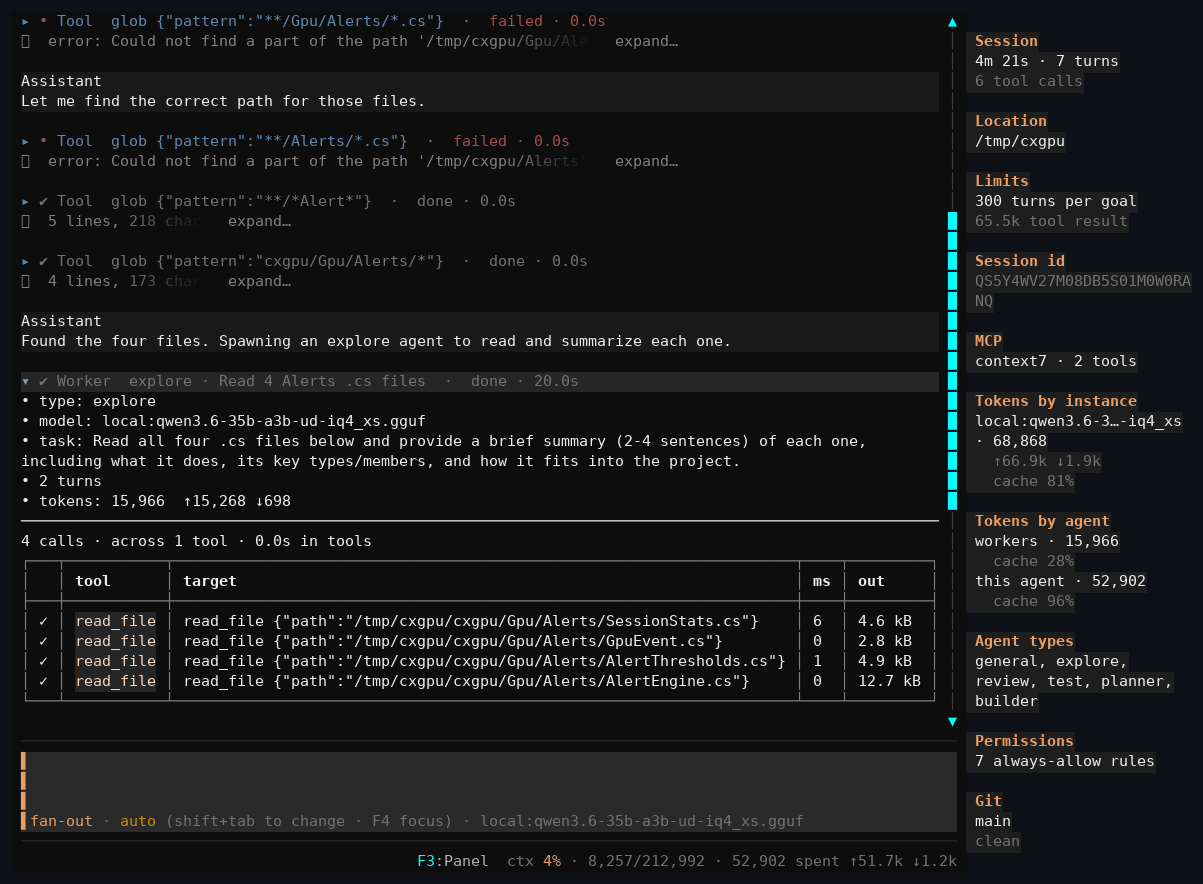
What a session looks like
Every capture is from a real session. Nothing is staged, and the mistakes are still in the pictures.
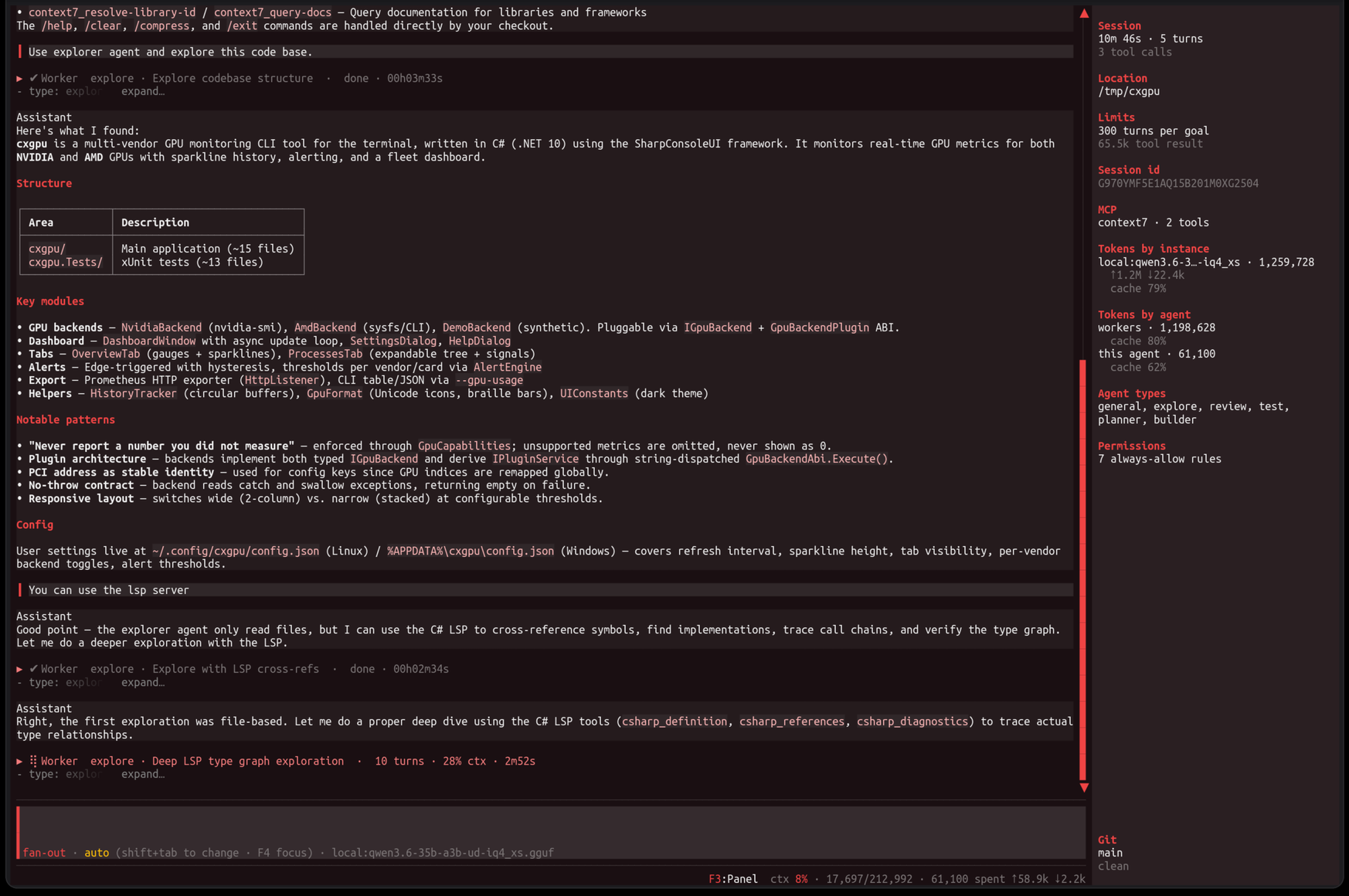
A session, end to end
Two workers explored a GPU monitoring tool and reported back. The agent wrote the summary you are reading from what they found, not from the files — and the panel on the right carries what that cost while it happened: 1.2M tokens across workers. The system prompt is built the same way every turn, so what the model has already read stays read.
The next capture is this same session, scrolled up.
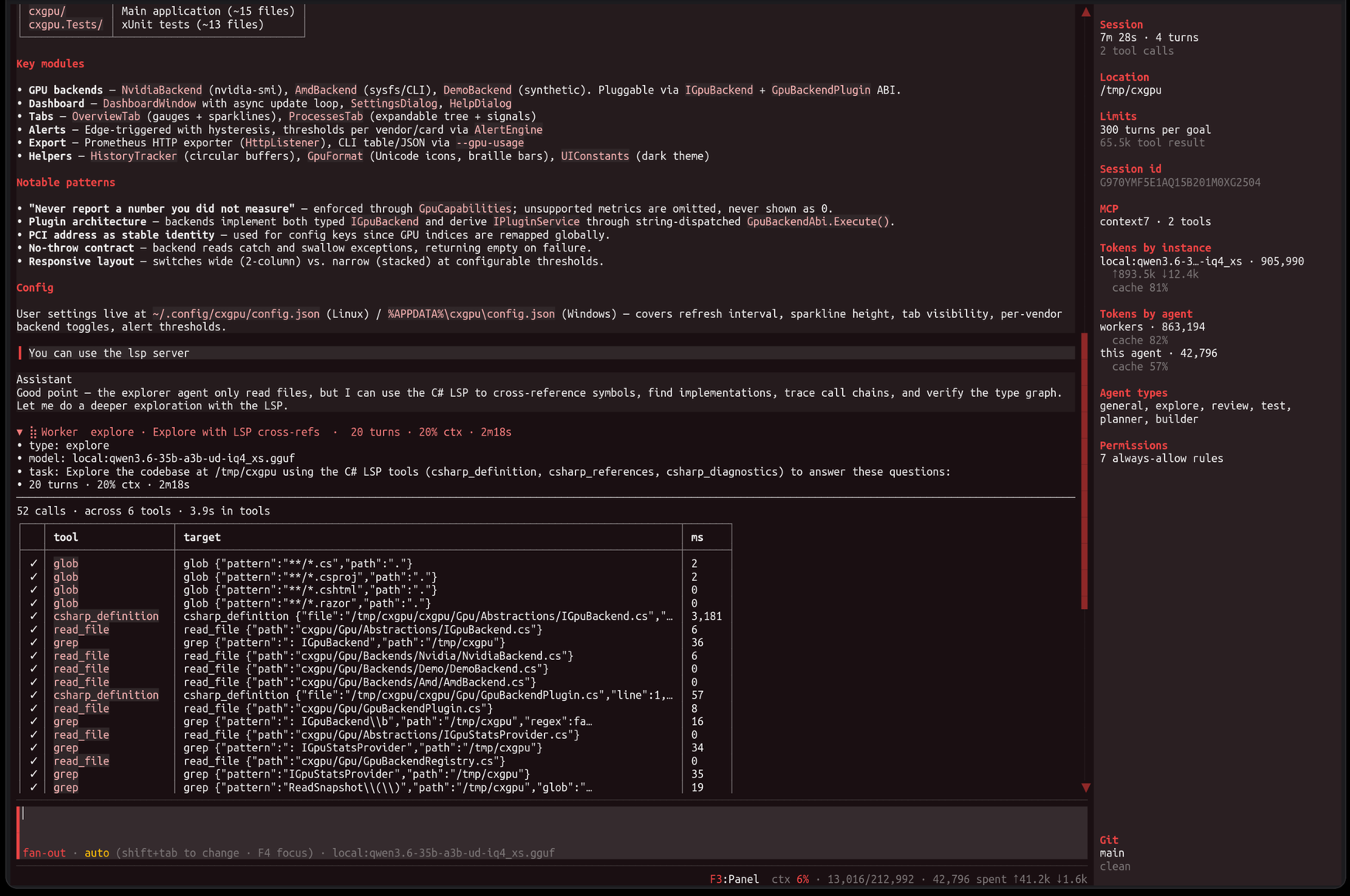
The same session, one worker open
Every collapsed worker expands into what it actually did: fifty-two calls across six tools in under four seconds, each with its arguments and its duration. Some are csharp_definition — a plugin's tools, sitting among the built-in ones with nothing to tell them apart.
You are not asked to trust a summary of the work. The work is there.
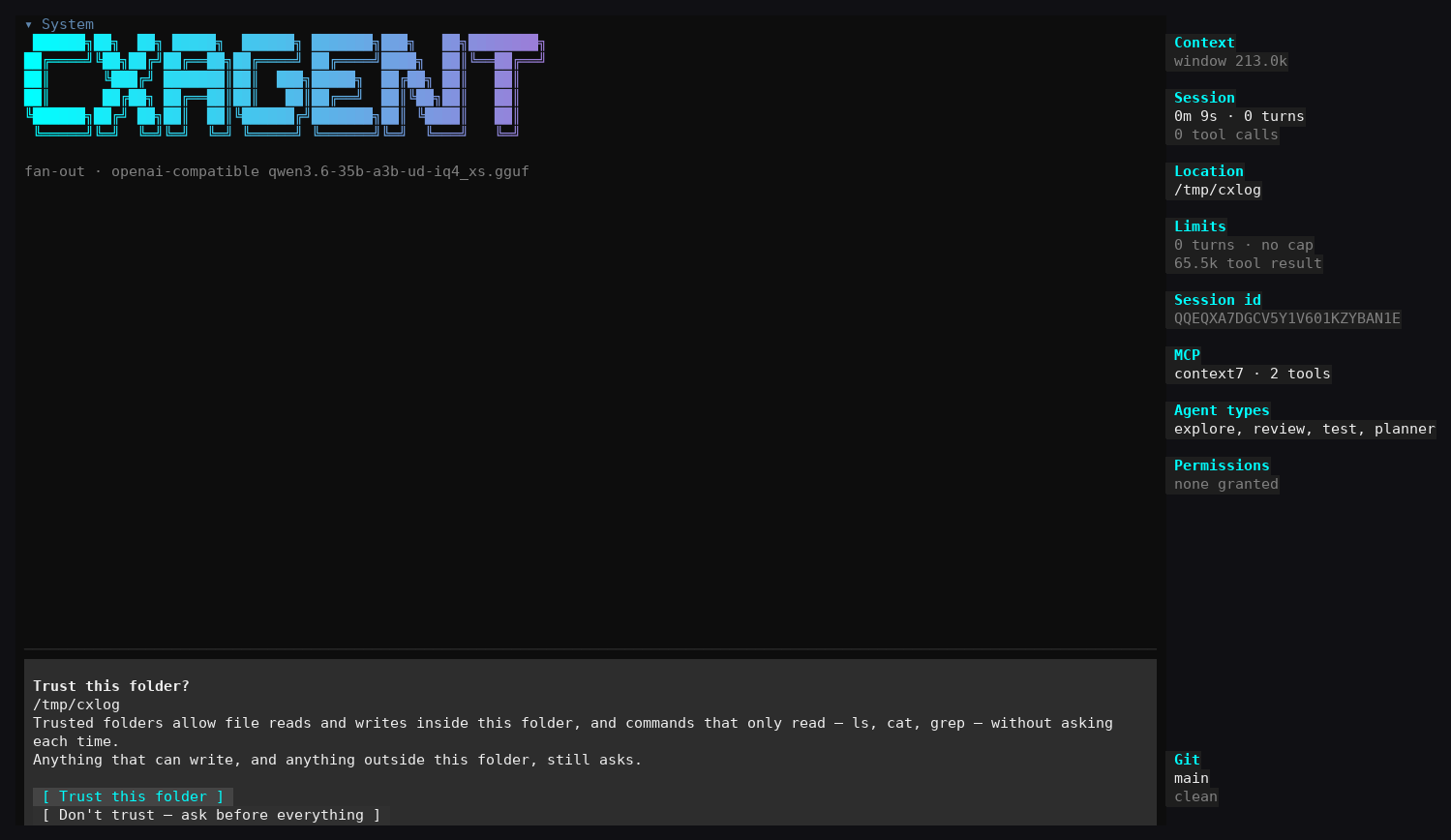
Trusting a folder
The first question of the first session. Reads and writes inside this folder stop asking; anything that writes elsewhere, and every shell command, still stops.
An agent in its own tab
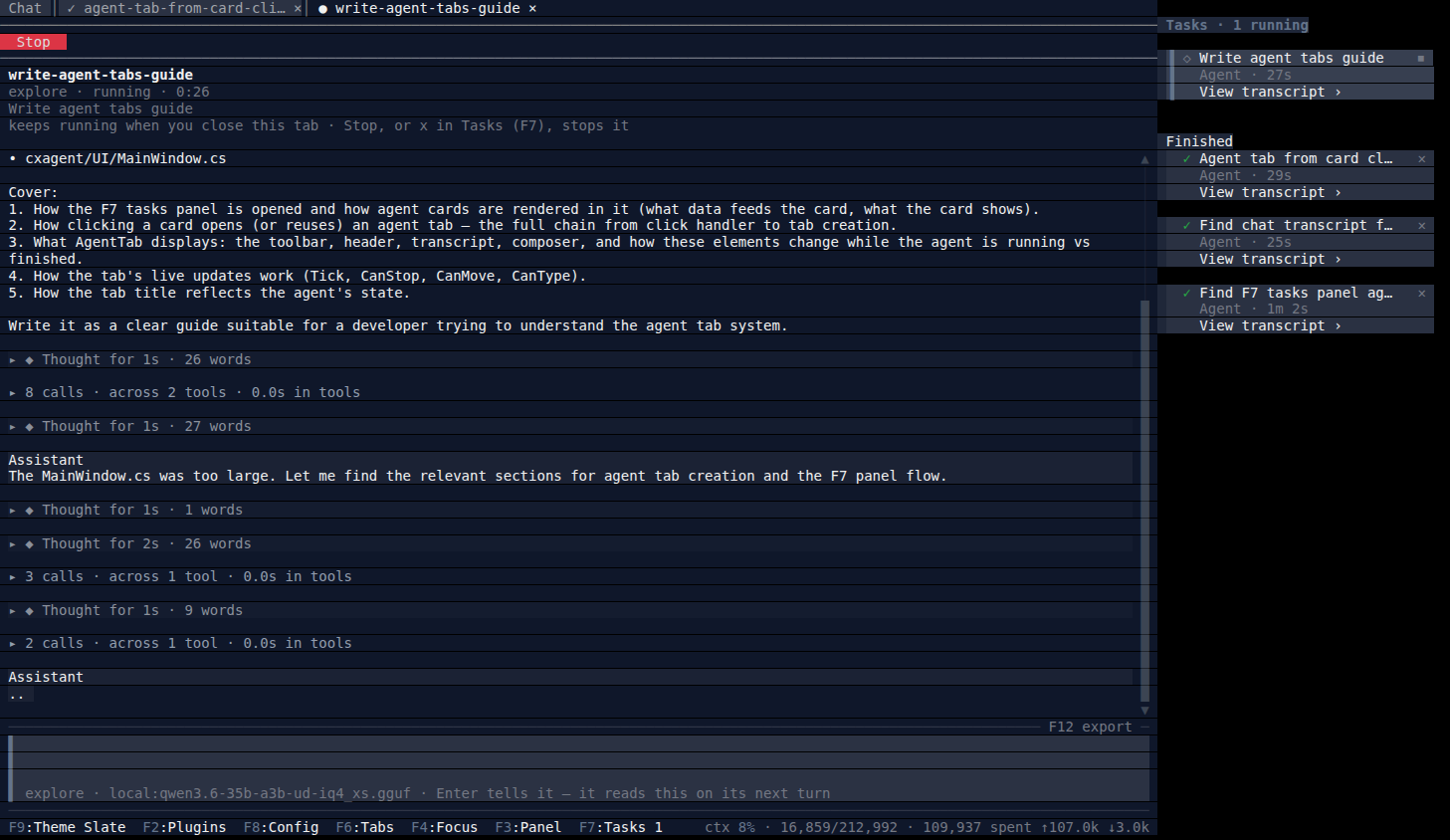
Sub-agents run in the background, listed in the tasks panel. Open one and it has a tab of its own: its brief, each step's thinking and tool calls, and its answer as it is written — with Stop, and a composer that talks to it rather than to the session.
When the decision is yours
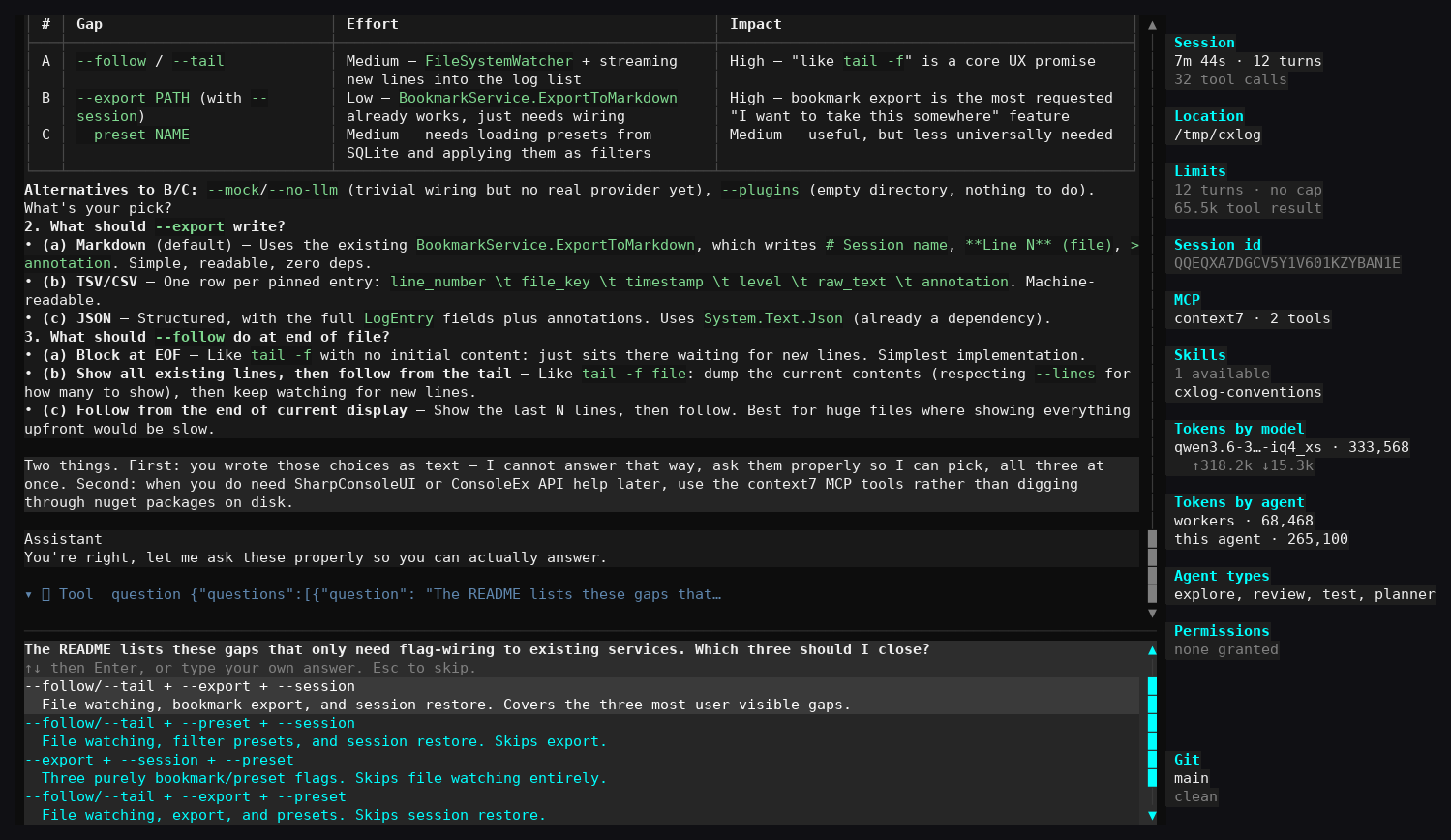
The model gets one call and up to four questions, presented as steps. Every option carries a description saying what it means — a list of bare labels asks you to guess what the model was thinking.
Running what it built
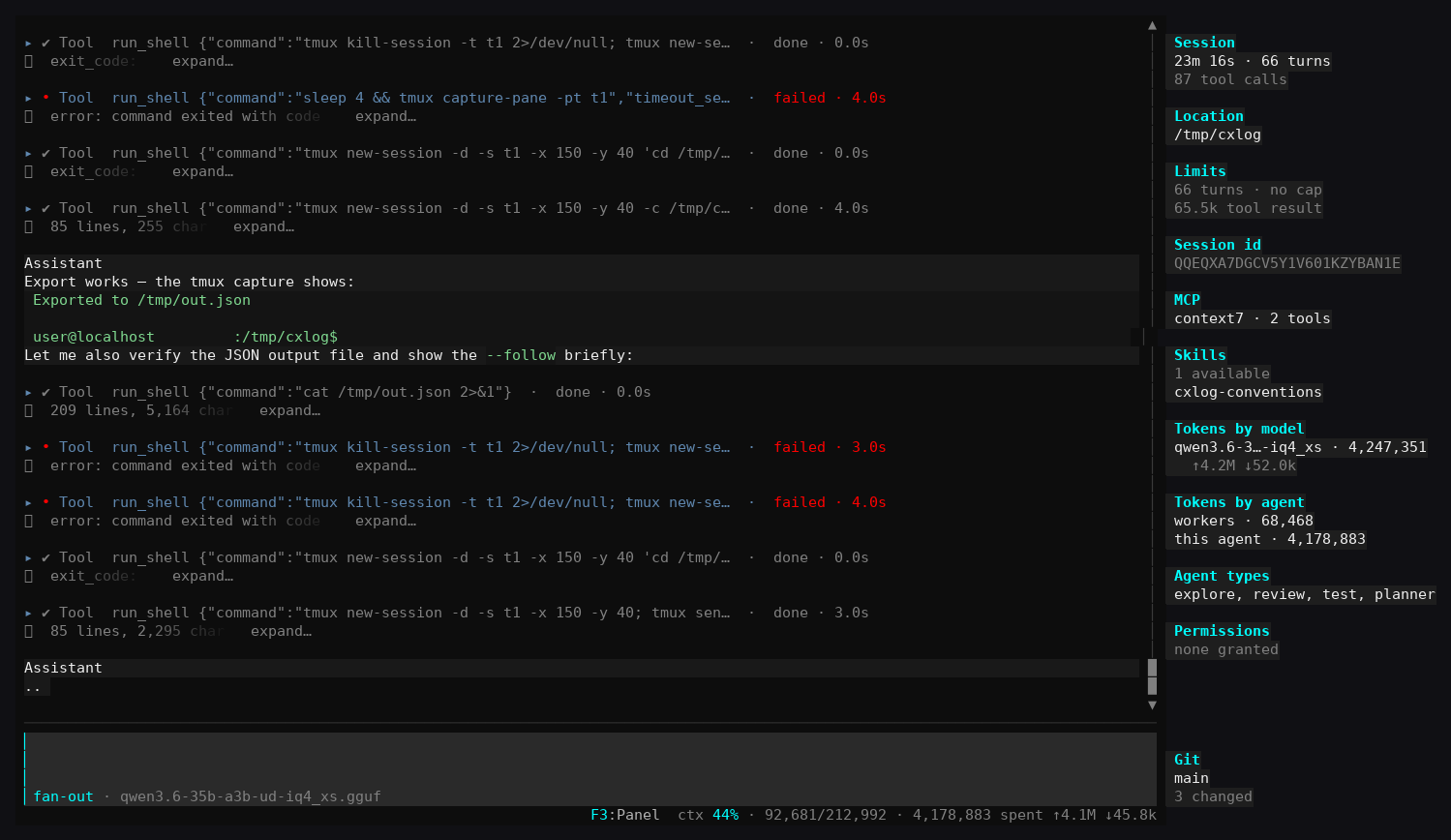
A feature that compiles but was never executed is not finished. Every shell command asks first. Failed calls render red and stay in the transcript — here the agent adapted its own invocation across three failures before the export ran.
Every call a worker made
A finished worker is one row; opened, it shows its own model, the task as it was briefed, its turns and tokens, then every call it made with the time each took and how much came back.
What it actually cost
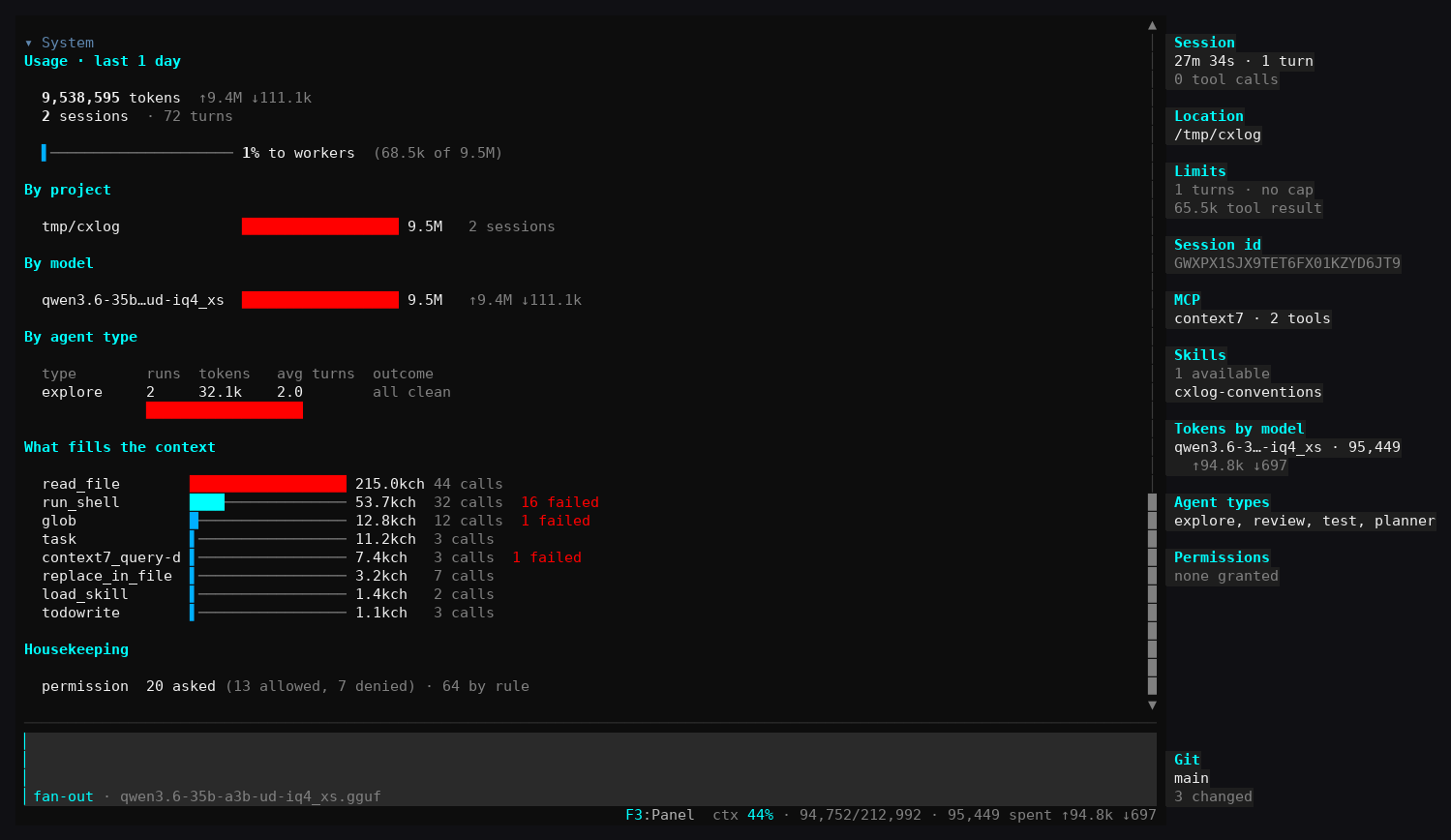
/stats ranks tools by characters returned rather than call count — a turn re-sends everything before it, so one tool returning 215k characters does not cost that once.
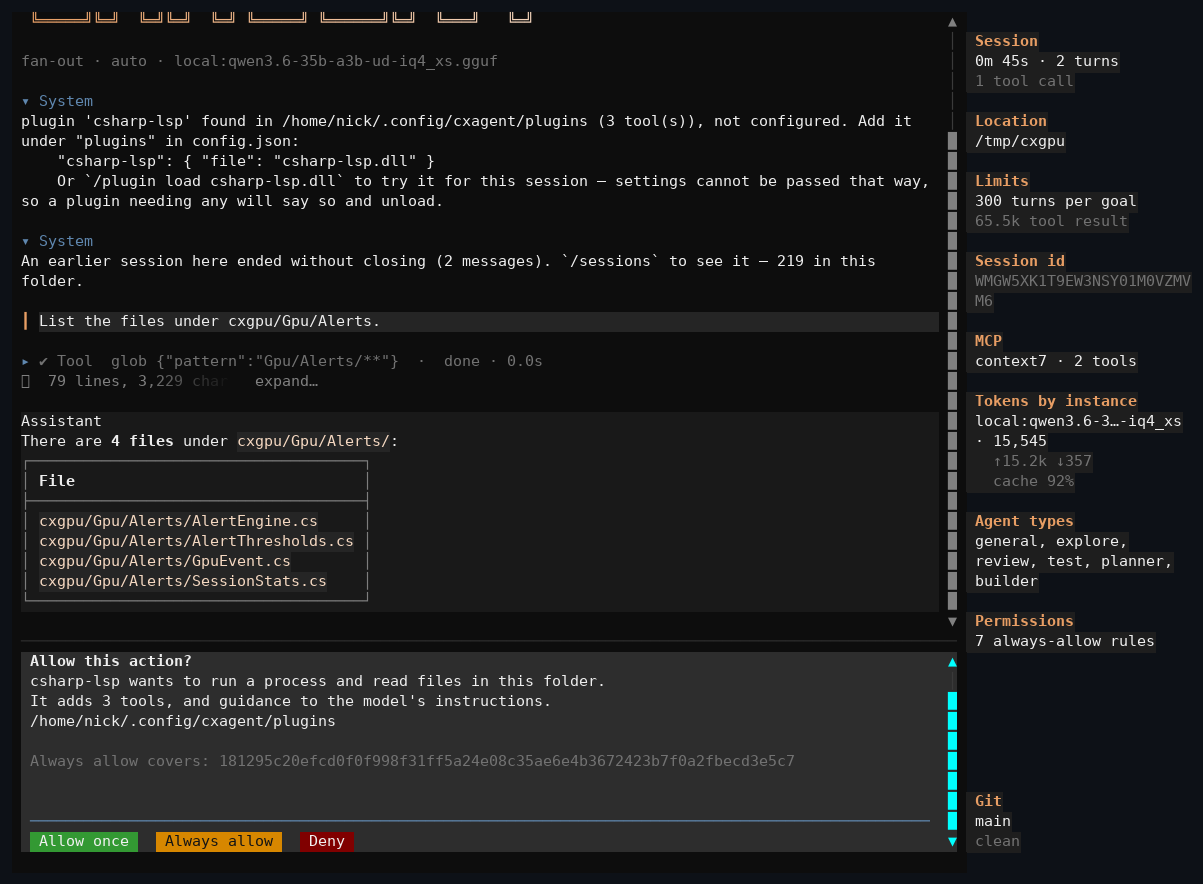
Loading a plugin
A plugin is a DLL cxagent did not ship. The prompt says what it will contribute and covers its approval with a hash of the whole load set — change a byte and the question comes back.
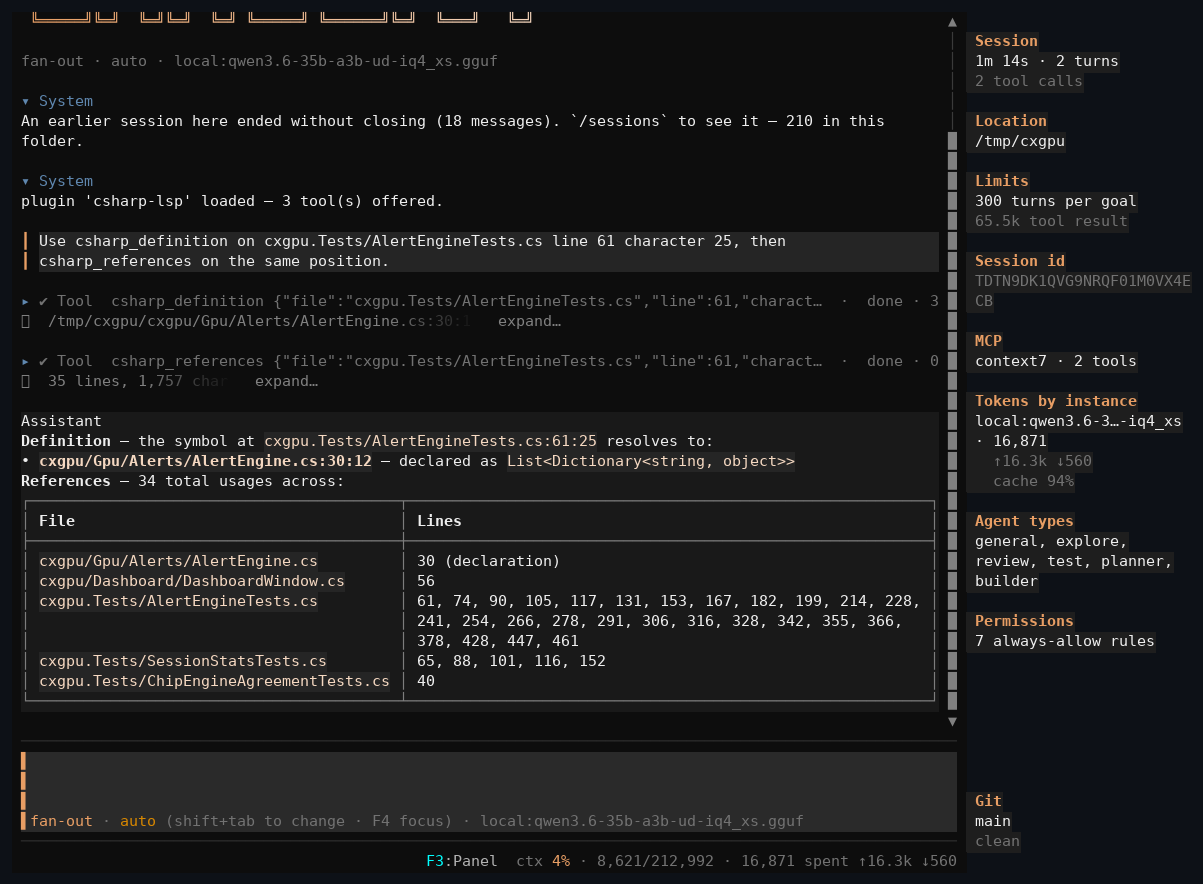
A plugin resolving a reference
csharp_definition resolves a reference in a test project to its declaration in the project under test — across a boundary grep cannot cross. The first call pays to index; everything after is answered from a warm index.
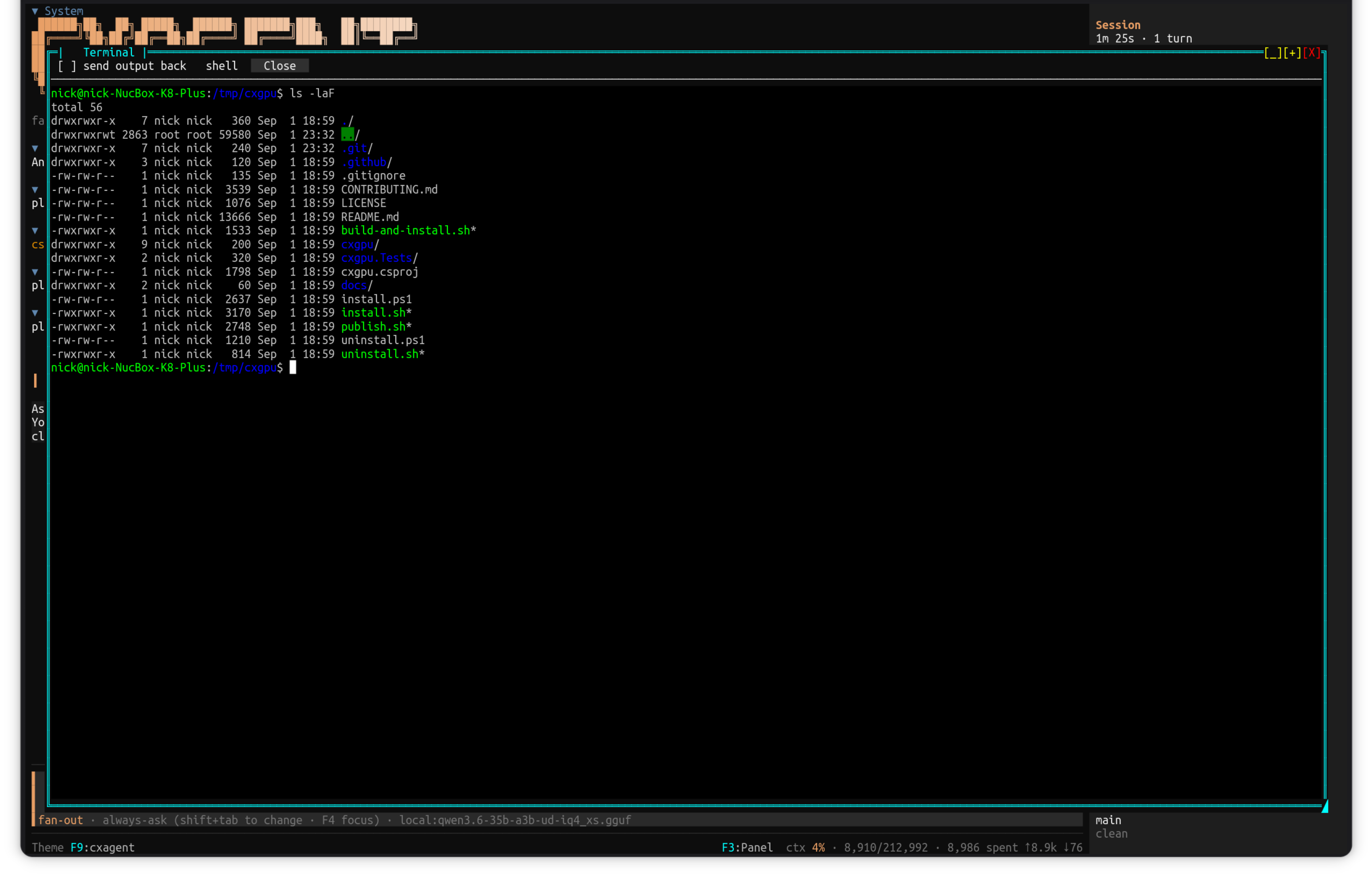
A terminal, for what a tool cannot do
A captured stream has nothing to type into, so a sudo password or a git rebase -i is where an agent stops and hands the job back. /shell opens a real PTY in a window over the session — the colours are the giveaway, since ls emits them only when it believes it is talking to a terminal.
Afterwards the agent is told what happened, queued rather than delivered into a turn of its own — so it does not start talking while you are still reading.
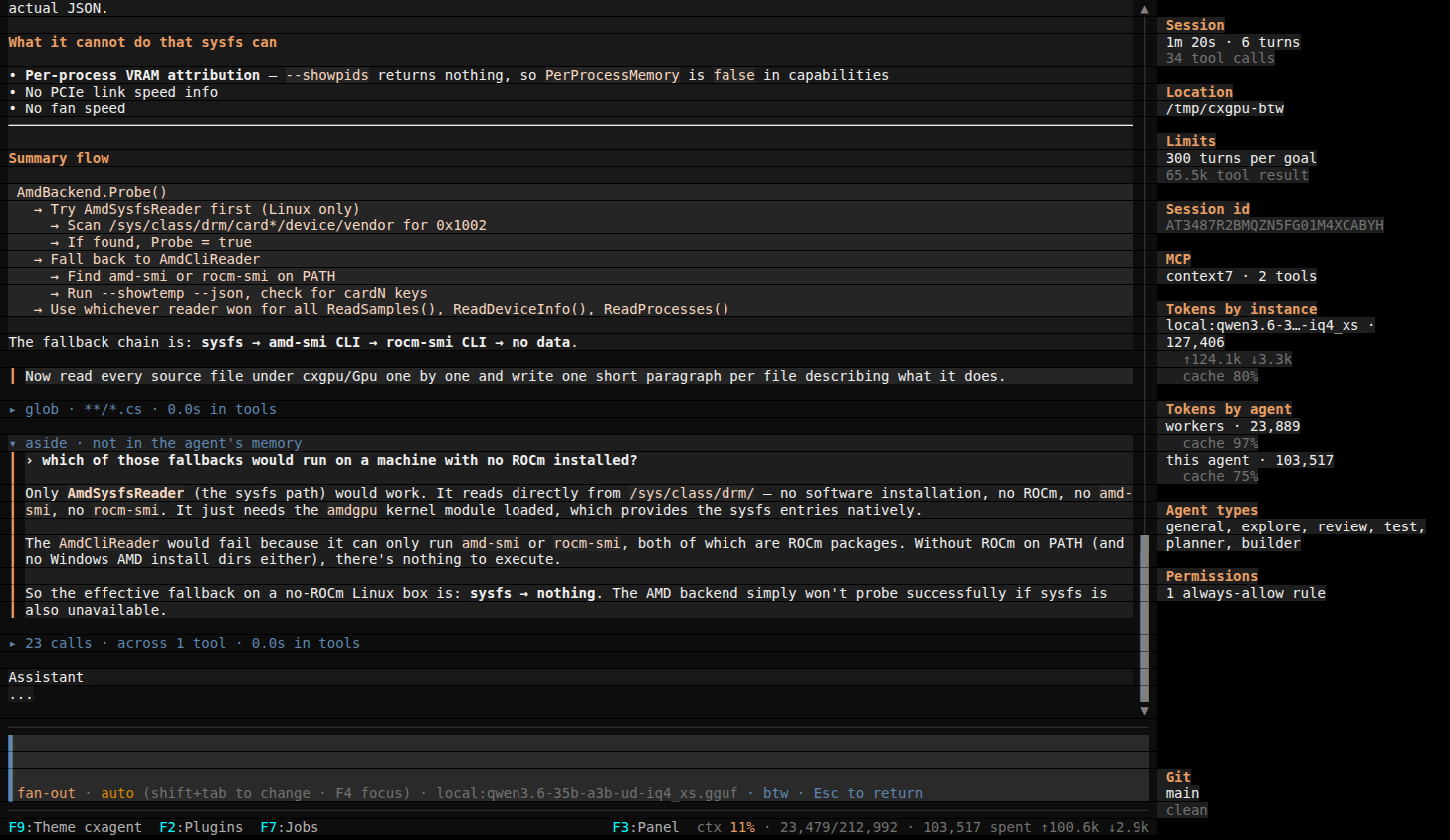
A question on the side
/btw asks about what the agent knows without adding to what it remembers. The aside starts from the conversation as the agent last sent it and answers in its own block while the main turn carries on — the calls above and below it are the agent, still reading.
It can read and nothing else, under the session's own permissions; a read the agent would be asked about is asked about here too.

One goal, no window
cxagent -p runs a goal and prints the answer, so it goes in a pipe, a script or a CI job. The options are Claude Code's — --output-format json, stream-json, -c to continue the run before — so a script written for claude -p works with cxagent swapped in.
Nobody is there to answer a prompt, so anything that would ask is refused and listed in the result; each run is an ordinary session you can open in the TUI.
A prompt you keep, as a command
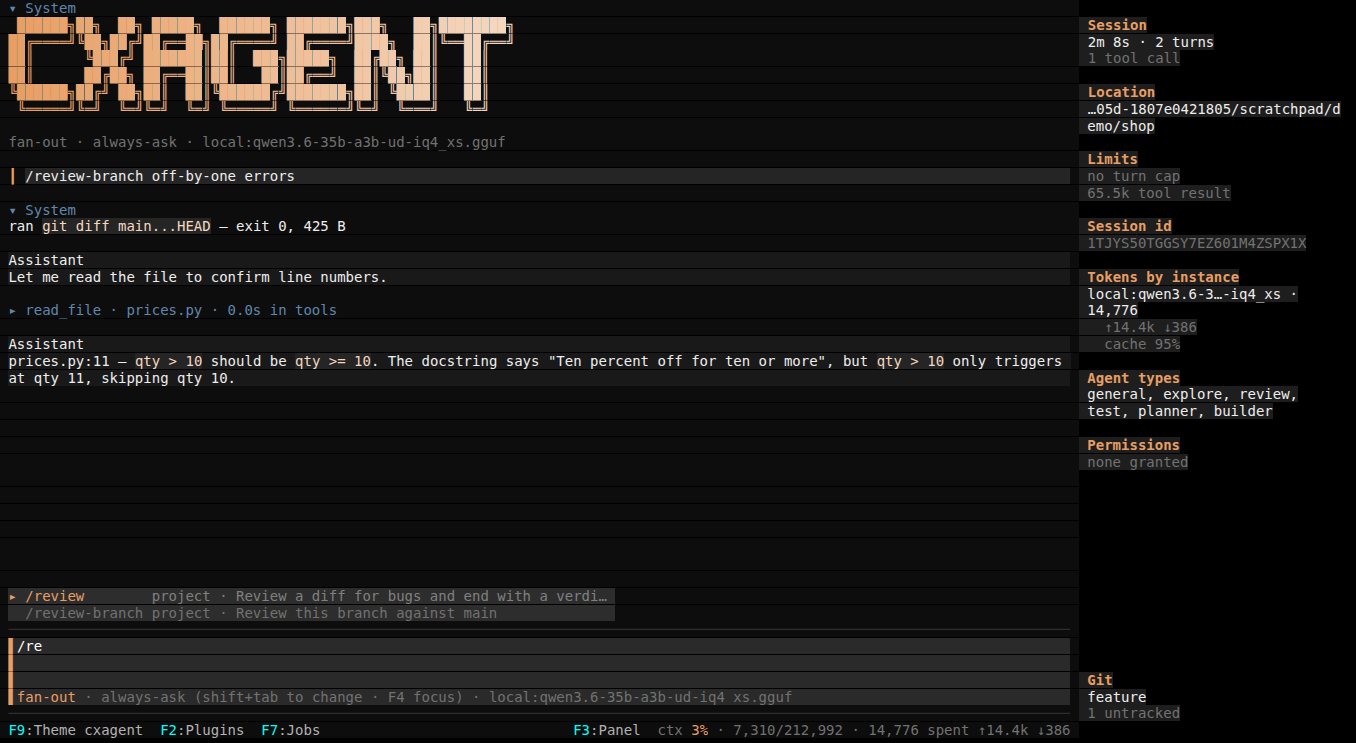
A markdown file in .cxagent/commands became /review-branch. The row shows what was typed; the model got the file, with the arguments filled in and the output of its git diff line — which asked first, as the agent's own shell calls do.
Claude Code's command format works as it is; the palette tags each one with where it came from, because the nearer file of a name wins.
What it thought, and how hard
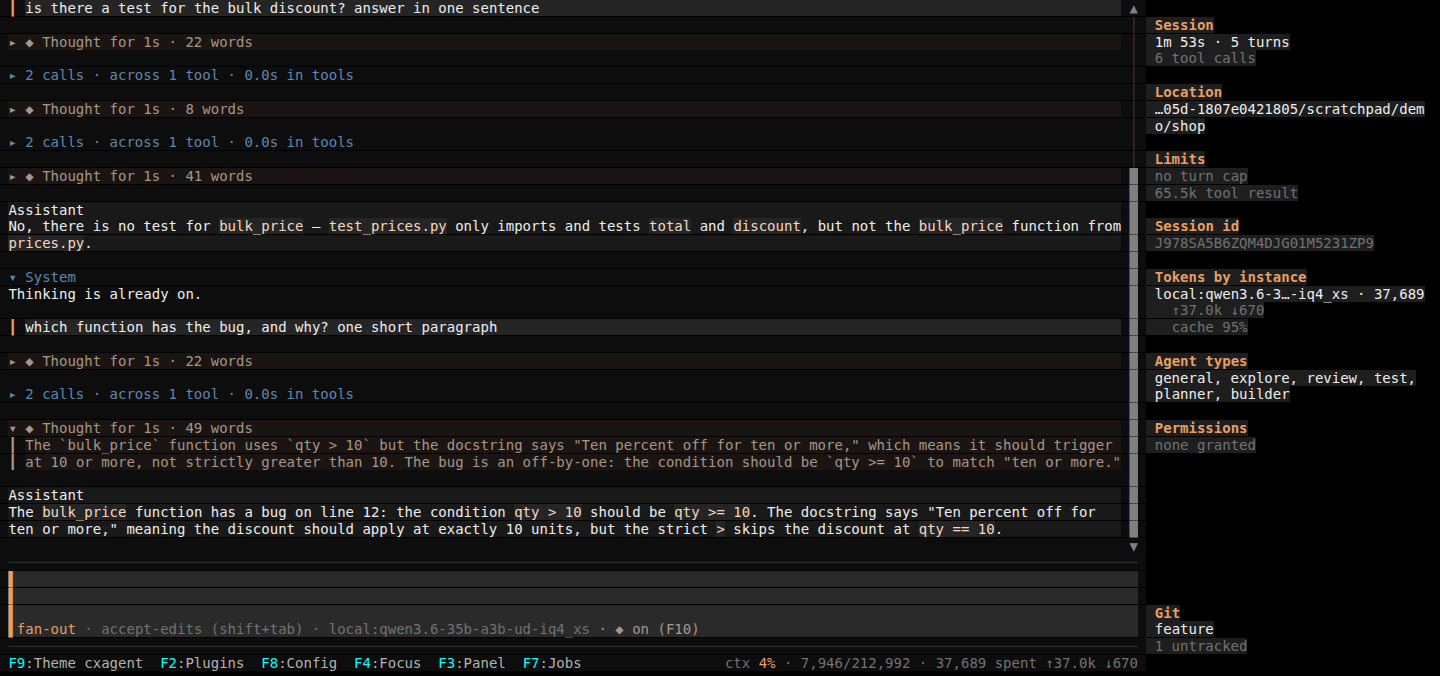
Each step that thought gets its own block, folded from the start and open on a click, so a run reads as thought, calls, thought, answer. Ctrl+O opens the latest; any other is a click away.
F10 and /think set the level the model offers — on or off for a llama.cpp server, low to max for Claude.
Providers, servers and agents, in the app
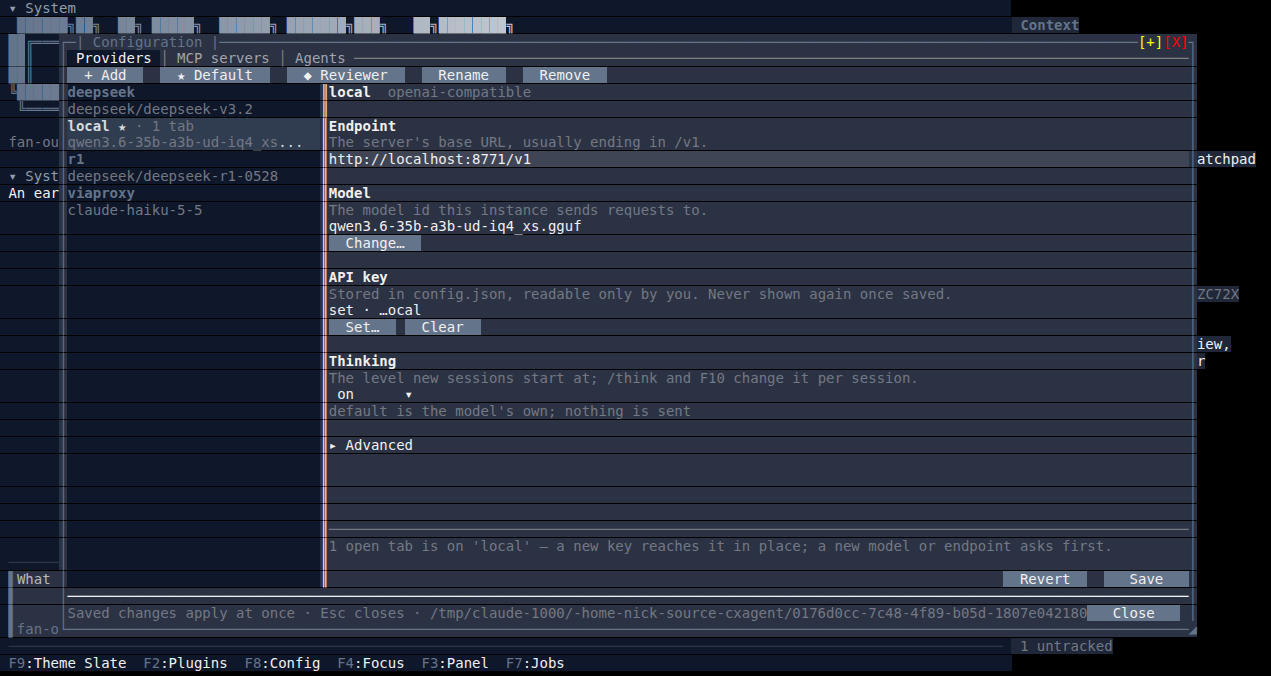
F8 opens one dialog for providers, MCP servers and sub-agent types. A new provider starts from a card — Anthropic, OpenRouter, OpenAI, Ollama, llama.cpp or any OpenAI-compatible endpoint — and its model is picked from what that endpoint serves, with each model's window and, on OpenRouter, its price.
A save is live. What the model cannot see — a new key, the reviewer, the default — applies in place; a new model would re-send each open tab's conversation, so you are asked how and when.
How it works
One context, the real bytes on disk, and a prompt that does not move under a running conversation.
It asks before it reaches out
In a folder you trust, reads and commands that only read stop asking, and writes inside it go through without asking in accept-edits mode. Commands that can write, and anything outside the folder, still stop.
Sub-agents keep their own context
A worker gets its own window and its own turn count. An agent type lists the
providers it may run on, each with a description, and the model picks one per spawn — or any
configured one, for a type set to "all". Every row, card, tab and prompt says where
a child runs, and the panel counts what workers spent separately from what this agent spent.
Agent types →
Bring your own model
Ollama, any OpenAI-compatible endpoint, or Anthropic — named in your config file, and switchable mid-session. There is no cxagent service between you and the model.
A plugin is a decision, not an install
Install one from the catalog with F2. Before any of it runs, cxagent reads the sidecar file beside it, shows you a hash of everything it would load, and asks — every time that hash changes.
The prompt does not move
Built the same way every turn, from facts sorted into a fixed order — so an MCP server connecting at turn 82, or a skill the filesystem happened to list differently, does not rewrite what the model has already read.
There is a real terminal when one is needed
A captured stream has nothing to type into, so a password prompt or an
interactive rebase is where most agents hand the job back. /shell opens a PTY in
a window over the session; what happened there reaches the model afterwards, queued rather
than delivered into a turn of its own.
A conversation you can come back to
Every session in a folder is recorded and listed, with the goal that
started it — /sessions resume 2, or by id from the command line. When one fills
up, /compress summarises it in place rather than making you start again.
It speaks MCP, and reads skills
Tools from any MCP server sit beside the built-in ones with nothing marking
them as additions. A skill is a SKILL.md the model loads when a task needs it —
re-read from disk every turn, so an edit is live on the next one.
A file opens beside the conversation
/open puts a file in a tab — line numbers, its language's
highlighter, and a save that keeps the bytes you did not edit. It tells the model afterwards,
which removes the quiet failure of an agent editing from a read you have since changed.
A second model can answer the prompts
Name a classifier in your config and /mode edits auto reviews
each write that would otherwise stop you. It fails closed — a timeout, an error or anything
it cannot parse means ask, never allow.
Some questions do not need the model
/diff reads the working tree, /stats reads the
ledger, /sessions reads what is recorded. They answer from git and from disk,
spending nothing and adding nothing to what the model has to read.
Several conversations, one window
/sessions new opens another conversation in its own tab, on any
folder you like. Each one keeps its own history, its own model, its own plugins and its own
permissions — a question asked in one never answers for another.
Tabs you drive from the keyboard
F6 moves focus to the tab strip, ← → change tabs, F6 goes back to the composer. A tab waiting on a permission prompt says so, so a session that needs you cannot sit quietly behind another.
Work that starts without you typing
A plugin can declare that it may start work in its own session, and the load prompt says so before you approve it. Unwiring it stops the turn it started — and leaves the one you started alone.
It comes in several colours
A theme is a startup flag, a config key, or a picker in the status bar —
--theme <name>, and cxagent --help lists what is installed. The
captures above are not all the same one.
One goal, or a script full of them
cxagent -p runs a goal with no window and prints the answer, as
text, JSON or a stream of events. -c carries a script's next step on in the same
conversation, which then opens in the TUI like any other. Anything that would have asked is
refused and listed in the result.
Your prompts, as commands
A markdown file becomes /review 42: arguments filled in, shell
lines and @file includes run through the same permission prompts as the agent's
own calls. Your Claude Code commands and skills work as they are.
Thinking you can see, and set
Each step's thinking is its own block, folded until you open it — from a
local llama.cpp model or from Claude. /think and F10 choose how hard
it thinks, from the levels the model itself says it accepts.
Any conversation, as markdown
F12 exports this one — readable for a person, or full for another
agent to carry on from — to a file or the clipboard, as a timeline with each sub-agent's work where
it happened. /sessions export does it for an earlier session, from any folder.
Where to go next
Installing, the plugin catalog, the library under the terminal, and the reference rendered from the repository's own markdown.
Read this before you run it
It edits your files. Inside the working folder it writes without asking —
that is the point of it, and it is why you should run it in a git repository with your work
committed. git diff is the review step; there is no undo inside cxagent.
It runs shell commands, and it spends your money. Every turn is a request to whichever provider you configured, and a sub-agent is a whole second run of turns. If you point cxagent at a paid API, you are paying for what it does, including work that turns out to be wrong.
Nobody is responsible for the results but you. cxagent is provided as-is under the MIT licence, with no warranty of any kind. Review the diff. Keep backups. Do not run it against anything you cannot afford to have changed. The full version of this section →