The cxagent plugin SDK
Everything an author outside this repository needs to write, test and ship a cxagent plugin:
| Folder | What it is |
|---|---|
templates/ | The C# plugin template, used by both cxagent plugin new and dotnet new cxagent-plugin (package CxAgent.Plugins.Templates) |
testing/ | CxAgent.Plugins.Testing: check and call a plugin from xunit, NUnit or MSTest |
c/ | The C SDK, cxp: cxp.h/cxp.c over the C ABI (cxagent_plugin.h), vendored cJSON, and cxp.cmake |
The command-line half is in cxagent itself: cxagent plugin new | check | call | pack | verify.
This page has two tutorials, C# and C, and an index of every other document about making a plugin. They all live in this folder.
Tutorial: a weather plugin, end to end
We build weather, one tool that tells the model the current weather in a city. It uses Open-Meteo, which is free and needs no key. Along the way the plugin asks the user before every lookup, reports progress while it works, is tested, and is packed for others to install.
You need the .NET 10 SDK and cxagent:
dotnet tool install -g cxagent1. Start from the template
cxagent plugin new weather --lang csharp
cd weather
Or dotnet new install CxAgent.Plugins.Templates then dotnet new cxagent-plugin -n weather: both give the same project.
weather/
  weather.csproj          the plugin, a net10.0 library
  weather.plugin.json     the sidecar: what the plugin offers, read before any of its code runs
  Plugin.cs               the code
  README.md               what a user reads in cxagent's plugin manager
  tests/                  xunit tests through CxAgent.Plugins.Testing
It builds and runs as it stands: dotnet build, then cxagent plugin call bin/Debug/net10.0 weather_greet '{"name":"Ada"}'. Now make it a weather plugin.
2. Say what it offers: the sidecar
Replace weather.plugin.json:
{
  "pluginContract": 4,
  "kind": "managed",
  "name": "weather",
  "version": "1.0.0",
  "spawns": false,
  "instructions": "weather_now gives the current weather for a city. Use it whenever the user asks what the weather is like somewhere.",
  "tools": [
    {
      "name": "weather_now",
      "description": "The current temperature, conditions and wind for a city, from Open-Meteo.",
      "inputSchema": {
        "type": "object",
        "properties": { "city": { "type": "string", "description": "The city, e.g. Athens." } },
        "required": ["city"]
      },
      "gated": "dynamic"
    }
  ]
}
The sidecar is the one copy of the manifest:
- cxagent shows it to the user before loading anything;
Loadreturns it unchanged (PluginManifest.FromSidecar);"gated": "dynamic"means the plugin decides per call whether to ask, and with what words.
3. Write the tool
Replace Plugin.cs:
using System.Text.Json;
using CxAgent.Core.Jobs;
using CxAgent.Core.Models;
using CxAgent.Core.Plugins;

namespace weather;

/// <summary>The current weather for a city, from Open-Meteo — free, and no API key.</summary>
public sealed class Plugin : IPlugin, IPluginGateSource
{
    private static readonly HttpClient Http = new() { Timeout = TimeSpan.FromSeconds(15) };

    public Task<PluginManifest> Load(IPluginContext context, CancellationToken ct) =>
        Task.FromResult(PluginManifest.FromSidecar(this));

    public Task Start(CancellationToken ct) => Task.CompletedTask;

    // The call leaves the machine, so the user is asked — naming the city, so they know what is sent.
    public PluginGate? Gate(string toolName, JobParameters call) =>
        new PluginGate($"look up the weather for {call.Get<string>("city")} on open-meteo.com");

    public async Task<JobResult> Invoke(string toolName, JobParameters call, IJobContext context, CancellationToken ct)
    {
        var city = call.Get<string>("city");
        if (string.IsNullOrWhiteSpace(city))
            return new JobResult { Success = false, ErrorMessage = "pass a city." };

        context.ReportProgress(25, $"finding {city}");
        using var places = JsonDocument.Parse(await Http.GetStringAsync(
            $"https://geocoding-api.open-meteo.com/v1/search?count=1&name={Uri.EscapeDataString(city)}", ct));
        if (!places.RootElement.TryGetProperty("results", out var results) || results.GetArrayLength() == 0)
            return new JobResult { Success = false, ErrorMessage = $"no place called '{city}'." };

        var place = results[0];
        var name = $"{place.GetProperty("name").GetString()}, {place.GetProperty("country").GetString()}";
        context.ReportProgress(60, $"asking for the weather in {name}");

        using var forecast = JsonDocument.Parse(await Http.GetStringAsync(
            "https://api.open-meteo.com/v1/forecast?current=temperature_2m,weather_code,wind_speed_10m"
            + $"&latitude={place.GetProperty("latitude").GetDouble()}&longitude={place.GetProperty("longitude").GetDouble()}", ct));
        var now = forecast.RootElement.GetProperty("current");
        var text = $"{name}: {now.GetProperty("temperature_2m").GetDouble()}°C, "
                 + $"{Describe(now.GetProperty("weather_code").GetInt32())}, "
                 + $"wind {now.GetProperty("wind_speed_10m").GetDouble()} km/h.";

        // "content" is what the model reads; give it a sentence it can repeat.
        return new JobResult { Success = true, Output = { ["content"] = text } };
    }

    public Task Stop(CancellationToken ct) => Task.CompletedTask;

    // WMO weather codes, as Open-Meteo reports them, grouped.
    private static string Describe(int code) => code switch
    {
        0 => "clear sky",
        1 or 2 or 3 => "partly cloudy",
        45 or 48 => "fog",
        >= 51 and <= 67 => "rain",
        >= 71 and <= 77 => "snow",
        >= 80 and <= 82 => "showers",
        >= 95 => "thunderstorm",
        _ => "mixed conditions",
    };
}
A failure is a result, not an exception: Success = false with a message the model can act on. ReportProgress shows on the call's row while it runs.
4. Check it and call it, with no session
dotnet build
cxagent plugin check bin/Debug/net10.0
check runs every test cxagent makes at load time — the sidecar, the contract, the names, the code's manifest against the sidecar — and prints ok or every problem, one per line.
$ cxagent plugin call bin/Debug/net10.0 weather_now '{"city":"Athens"}'
asks: look up the weather for Athens on open-meteo.com
stopped: a user would be asked — pass --answer allow or --answer deny

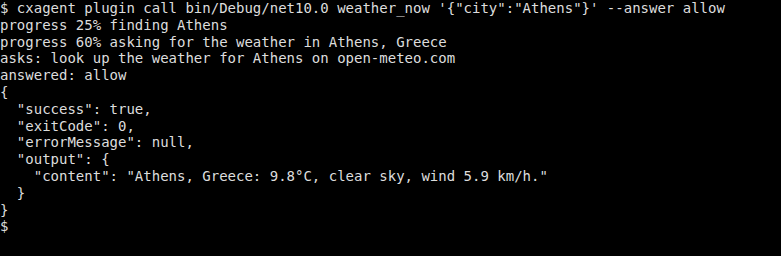
$ cxagent plugin call bin/Debug/net10.0 weather_now '{"city":"Athens"}' --answer allow
progress 25% finding Athens
progress 60% asking for the weather in Athens, Greece
asks: look up the weather for Athens on open-meteo.com
answered: allow
{
  "success": true,
  ...
  "output": {
    "content": "Athens, Greece: 9.8°C, clear sky, wind 5.9 km/h."
  }
}
call runs the real lifecycle once: Load, Start, the permission question, Invoke, Stop. It does so without a model, so you see exactly what your code does:
5. Test it
Replace tests/PluginTests.cs:
using CxAgent.Plugins.Testing;
using Xunit;

public class PluginTests
{
    private static readonly string PluginFolder = Path.GetFullPath(Path.Combine(
        AppContext.BaseDirectory, "..", "..", "..", "..", "bin", "Debug", "net10.0"));

    [Fact]
    public async Task ItLoads() => Assert.Empty(await PluginHarness.CheckAsync(PluginFolder));

    [Fact]
    public async Task ItAsks_NamingTheCity()
    {
        await using var plugin = await PluginHarness.LoadAsync(PluginFolder);

        var call = await plugin.CallAsync("weather_now", new { city = "Athens" });

        Assert.Equal("look up the weather for Athens on open-meteo.com", call.Gate!.Display);
        Assert.True(call.StoppedAtGate);
    }

    [Fact]
    public async Task Allowed_ItAnswersForThePlace()
    {
        await using var plugin = await PluginHarness.LoadAsync(PluginFolder);

        var call = await plugin.CallAsync("weather_now", new { city = "Athens" }, answer: GateAnswer.Allow);

        Assert.True(call.Result!.Success, call.Result.ErrorMessage);
        Assert.StartsWith("Athens, Greece:", (string)call.Result.Output["content"]!);
        Assert.Contains(call.Progress, p => p.Percent == 60);
    }
}
dotnet test testsThe harness is the same code as check and call. It loads the plugin the way a session does and asks the same question a session would.
6. Use it yourself
Copy the build into cxagent's plugins folder, one folder per plugin:
mkdir -p ~/.config/cxagent/plugins/weather
cp bin/Debug/net10.0/weather.dll bin/Debug/net10.0/weather.plugin.json README.md ~/.config/cxagent/plugins/weather/
Then, in cxagent, run /plugin load weather.dll and ask "what's the weather in Athens?". You are asked once, with the sidecar's summary, whether to load the plugin. Then the model calls weather_now, and you are asked about Athens before anything leaves the machine. To load it at every start, add it with /plugin browse, or in config.json:
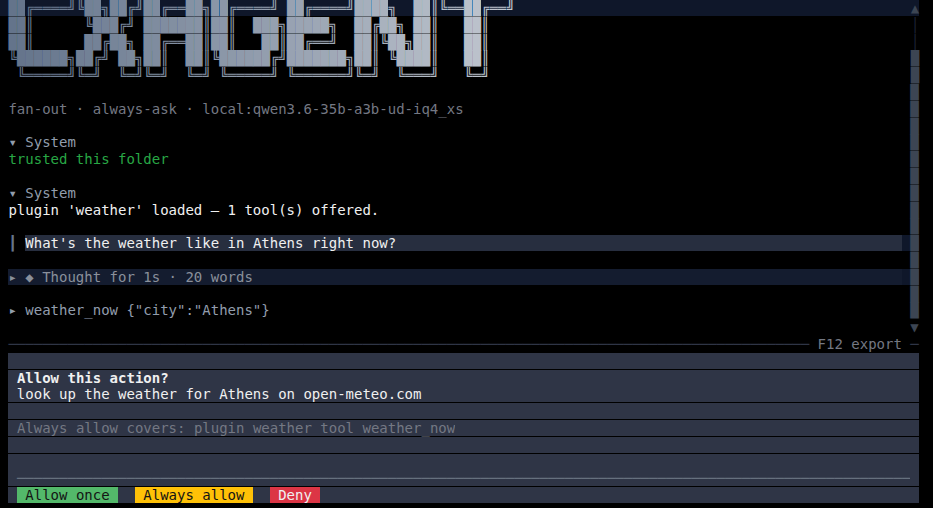
"plugins": { "weather": { "file": "weather.dll", "enabled": true } }The plugin's own question, in the words Gate returned:
And the model's answer, built from the tool's content:
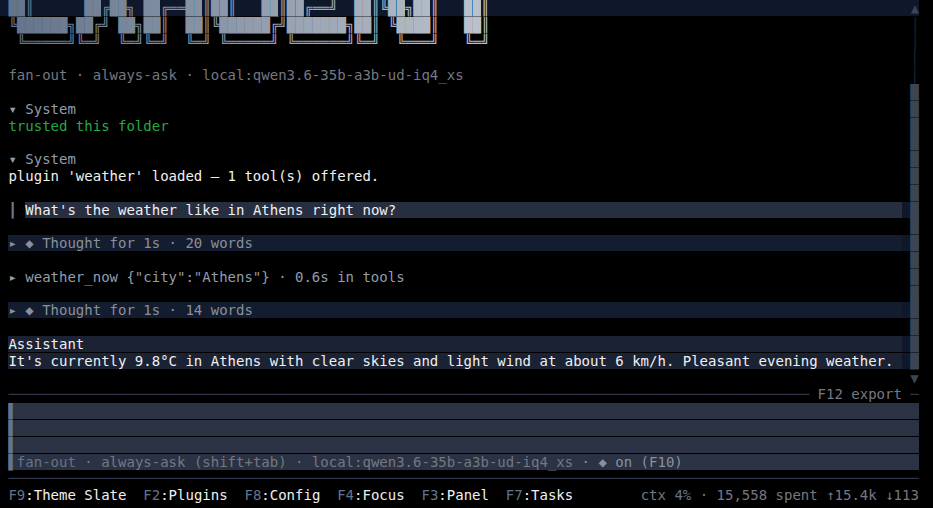
In an asking mode, cxagent first asks once whether to use the tool at all ("use the weather_now tool in this folder"). That question is cxagent's, and the same for every tool. The one above is your plugin's.
7. Pack it for others
Say what it is in weather.csproj, or with --description, --publisher, --license and --repository, or in a JSON or YAML file passed as --info. The template leaves the description and the license empty on purpose, because they are yours to choose:
<Description>The current weather for any city, from Open-Meteo.</Description>
<Authors>you</Authors>
<PackageLicenseExpression>MIT</PackageLicenseExpression>
<RepositoryUrl>https://github.com/you/weather</RepositoryUrl>
dotnet build -c Release
cxagent plugin pack bin/Release/net10.0 --out distpack refuses a plugin check refuses. Otherwise it writes dist/weather.zip (the dll, the sidecar and the README), its sha256, dist/weather.catalog.json — the catalog entry — and the steps that are left. Every option is in the command line.
8. Verify, then publish
Before uploading, point the entry's "url" at the zip on disk — a relative path resolves from the entry file's folder, so "url": "weather.zip" works — and check what a user's install would get, without running any of your code:
cxagent plugin verify dist/weather.catalog.jsonThen upload the zip, put its https:// URL in the entry, verify again and submit it: Publishing a plugin walks through each step.
Tutorial (C): wordcount
We build wordcount, one tool that counts the lines and words in a file. It asks before reading a file outside the working folder, reports progress as it reads, and streams a running count. You need a C compiler, CMake 3.20 or later, and cxagent.
1. Start from the template
cxagent plugin new wordcount --lang c
cd wordcount
wordcount/
CMakeLists.txt one cxp_add_plugin() call, plus a CTest that runs the plugin through cxagent
wordcount.plugin.json the sidecar, with "kind": "native"
wordcount.c the tool
README.md
cxp/ the C SDK — cxp.h, cxp.c, cxp.cmake, cJSON — so the project builds anywhere
.github/workflows/ builds all six platforms; on a tag, packs them into a releaseThe template is the tutorial plugin: everything below is already in wordcount.c.
2. Read the tool
The whole plugin is a table and two functions:
CXP_PLUGIN(
    CXP_TOOL("wordcount_count", count, count_gate)
)count_gateresolves the file againstcxp_working_directory(). It returnscxp_no_ask()for a file inside the folder, andcxp_ask(cxp_format("read %s, outside the working folder", path))for one outside.countreads the file:cxp_progress(call, percent, …)every tenth of the file;cxp_stream(call, "N lines… ")every thousand lines;- finally
cxp_ok_text(cxp_format("%s: %lld lines, %lld words", …)).
A file it cannot open is
cxp_error(…), andcxp_setting_bool("countBlankLines", 0)reads the one setting.
Nothing is freed by hand: cxp_format strings live until the call returns.
3. Build, check, call
cmake -B build && cmake --build build
cxagent plugin check build
cxagent plugin call build wordcount_count '{"file":"CMakeLists.txt"}'
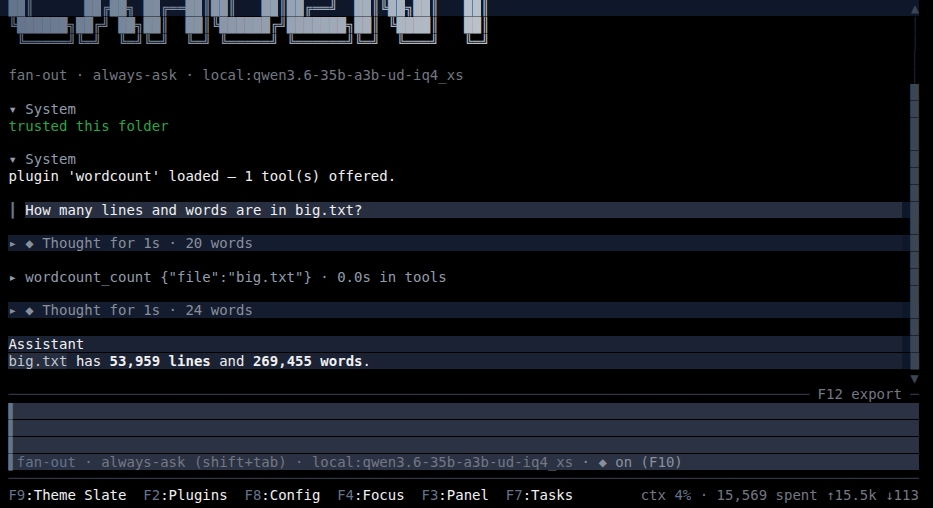
The build folder holds wordcount.so (.dylib or .dll elsewhere), its sidecar and the README: everything a user installs. Point the call at any file; the one below counts a 60,000-line file, big enough to show the progress and the running count.
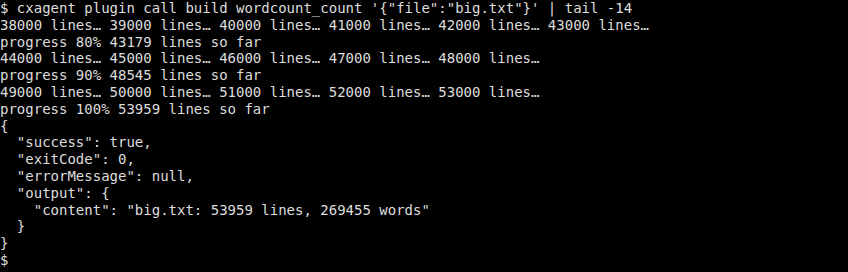
A file outside the folder stops at the question a user would be asked:
$ cxagent plugin call build wordcount_count '{"file":"/etc/hosts"}'
asks: read /etc/hosts, outside the working folder
stopped: a user would be asked — pass --answer allow or --answer deny
4. Test it
ctest --test-dir buildThe template's CTest runs cxagent plugin call on the project's own CMakeLists.txt, the real lifecycle through cxagent. A C# test can drive the same library through CxAgent.Plugins.Testing, which carries the plugin host.
5. Use it
Copy build/wordcount.so, build/wordcount.plugin.json and README.md into ~/.config/cxagent/plugins/wordcount/. Add "wordcount": { "file": "wordcount.so", "enabled": true } under "plugins" in config.json, then ask about a file:
6. Pack and verify
cxagent plugin pack build --native build/wordcount.so=linux-x64 --info catalog-info.yaml --out dist
cxagent plugin verify dist/wordcount.catalog.json
--native <library>=<platform> names each build. The workflow in .github/workflows/build.yml passes all six on a release. catalog-info.yaml holds what the entry needs and the sidecar does not:
description: Counts the lines and words in a file.
publisher: you
license: MIT
repository: https://github.com/you/wordcount
Then upload, point each "url" at its zip, verify again, and submit: Publishing a plugin.
Where to go next
Every document about making a plugin, in this folder:
- The contract — the lifecycle, the sidecar, permission, commands, settings, spawning processes, starting turns from a plugin, and reporting while a call runs.
- The command line —
cxagent plugin new,check,call,packandverify: every option, the--jsonshapes and the exit codes. - Testing — checking and calling a plugin from the command line and from xunit, NUnit or MSTest with CxAgent.Plugins.Testing.
- The C SDK — the
cxpAPI, memory and threads, and building for every platform. - The C ABI — what crosses each call of
cxagent_plugin.h, for a plugin written withoutcxp. - Publishing — pack, upload, verify, submit, and how a plugin built in this repository is released.
- Two complete examples sit beside this folder, the same calculator in C# and in raw C:
examples/CalculatorPluginandexamples/CalculatorAbiPlugin.