cxdbg
A debugger for SharpConsoleUI applications. It attaches to a running app over its diagnostics socket and asks it questions, or acts on it.
A terminal application is the one program you cannot printf-debug: the screen
is the output, and a Console.WriteLine corrupts the thing you are trying to
read. cxdbg is the way in - it asks over a socket and prints the answers
somewhere else.
A protocol verb answers in JSON, so anything here pipes into jq and a script
can do by itself what this page does by hand. The readable layer - show,
why - formats instead, and takes --json when you want the reply raw.
dotnet tool install -g cxdbg
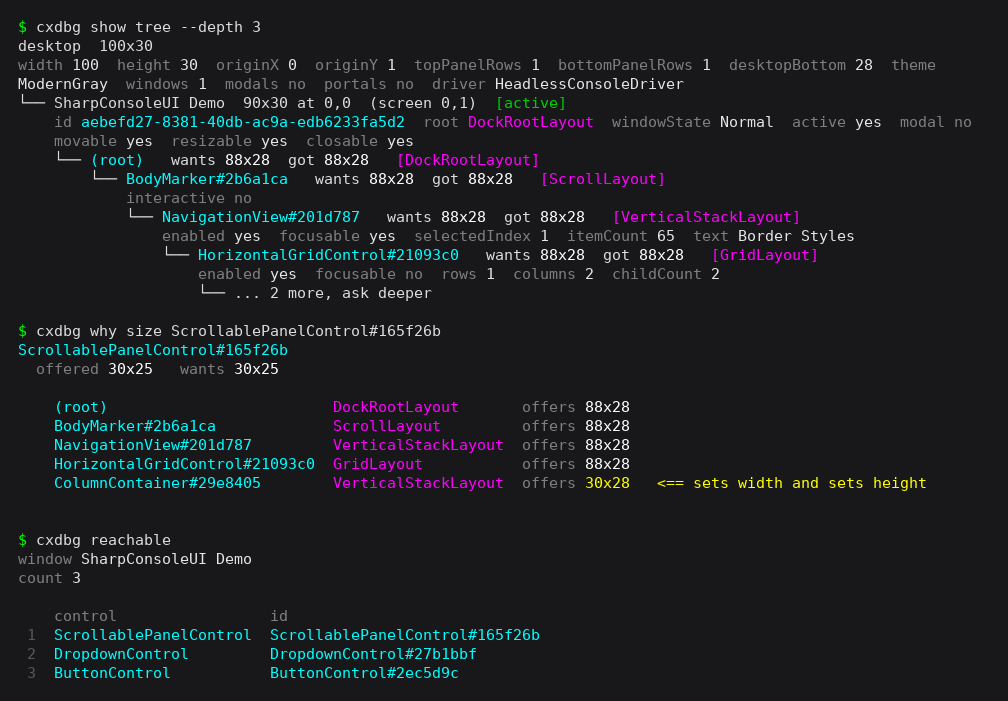
Three questions about a live app: what the layout tree holds, which container decided a control's size, and what Tab can reach.
Starting an app under it#
cxdbg run ./MyApp
Everything after -- belongs to the application, passed through unchanged, and
cxdbg reads none of it. cxdbg names the socket before the app exists, so there
is nothing to hunt for afterwards.
Where it runs#
An app wants a terminal of its own: it asks for socket consent on the plain console before it paints, and someone has to read and answer that. Two programs drawing on one screen produce neither. So cxdbg prints the socket and asks:
  socket  /run/user/1000/cxdbg-990879.sock

start it in a new terminal (kitty), or here? (T/h)
Answer h and it runs as a child of cxdbg, which then exits — the app keeps
this terminal and paints over it.
Three things take the question away:
--no-terminal |
run it here, do not ask |
--attach |
a terminal of its own, necessarily: the prompt takes over this one |
| piped or redirected stdin | nobody to ask, so nothing is started — see below |
With no emulator on the machine, cxdbg says so and asks whether to run it here
anyway. CXDBG_TERMINAL picks one; CXDBG_TERMINAL=none says there is none.
When cxdbg starts nothing — declined, or a scripted run with no terminal — it prints the two lines to run the app yourself, with the socket it already named, so the path still works afterwards:
  export SHARPCONSOLEUI_DIAGNOSTICS_SOCKET=/run/user/1000/cxdbg-e0afbe.sock
  ./MyApp
Add --attach to start the app and open a prompt on it in one go.
cxdbg does not supervise what it starts: the app is still running when cxdbg exits. Leaving the prompt offers to stop it, since the prompt knows exactly which process it has been talking to - but declining is the default, and a redirected input is not asked at all.
The prompt#
One question per command is right for a script and tiring for a person working
through a problem. shell keeps the socket open:
cxdbg shell -s /run/user/1000/app.sock # `attach` is the same command
connected to pid 48213 (app.sock). exit to leave.
cxdbg> focus
window Settings
focused DropdownControl

cxdbg> key --spec Tab
sent 1 key

cxdbg> focus
window Settings
focused ButtonControl

cxdbg> exit
stop pid 48213 as well? (y/N)
Up and down walk the history, Tab completes a verb, then that verb's fields,
then a path after >. Ctrl+A, Ctrl+E, Ctrl+U and Ctrl+K edit the line.
A leading dot marks cxdbg's own layer, so no verb the protocol ever gains can collide with one:
.help .help tree |
what can be typed, or one verb in detail |
.show <verb> .why size <control> |
the readable layer, in place |
.last [show] .last > <file> |
the reply that was too big to print |
.socket |
which application this is |
connect <path> |
move to another application, keeping your place |
Replies too big to print#
A screenshot is 75KB of base64 and a cells snapshot 51KB. Printed at a prompt either one takes your scrollback with it, so above 8KB the prompt says what it is and keeps it:
cxdbg> image
75610 bytes of png (704x448), not printed.
  Give --path to write it, or redirect it at the prompt.

cxdbg> .last > /tmp/shot.png
wrote 75610 bytes to /tmp/shot.png
That file is a real PNG, not base64: a reply carrying data and an encoding
is written as the decoded bytes, and the reply's own format decides which
- not the filename. Everything else is written as the protocol sent it, so
jqcan read it.
> works on any verb, not only the big ones, and >> appends.
Asking#
Three verbs answer the same question three ways, and the disagreement between them is usually the bug:
cxdbg show tree |
what layout BELIEVES, desired against arranged |
cxdbg snapshot |
what the screen SHOWS, as text |
cxdbg snapshot --format cells |
what is in each COLUMN, one entry per cell |
cxdbg image |
what it LOOKS LIKE, with real glyphs |
cxdbg desktop |
the SCREEN: size, origin, modals, portals |
cxdbg control --control X |
what ONE control is, and what contains it |
cxdbg inspect --x 20 --y 10 |
what is under a POINT |
A control with a zero-width arranged rect is in tree, reachable by focus, and
invisible in snapshot. That pattern is obvious here and invisible to tmux.
When the columns do not add up, ask for cells:
cxdbg snapshot --format cells --y 7 --h 1
row 7
    2   日   width 2
    3        <- the column before this one is two wide
    4   A    width 1
Text cannot answer this. It folds a wide glyph into one character and drops the second column it occupies, which is exactly what you are looking for.
--format markup gives the same frame as text that parses back into cells, for
keeping or replaying:
cxdbg snapshot --format markup > frame.txt
When the question is about one control rather than the whole tree:
cxdbg control --control okButton
control ScrollablePanelControl
layout ScrollLayout
visible true
desired w 30  h 10
bounds 30x25 at 0,3
absolute 30x25 at 0,3
id ScrollablePanelControl#165f26b
props width   height   horizontal Left  vertical Fill  sticky None
state enabled true  focusable true  scrollOffset 0  viewportExtent 25  contentExtent 65
window SharpConsoleUI Demo

   control  id  layout          bounds
1  (root)   -   DockRootLayout  88x28 at 0,0
Its size, its state, and the containers above it - outermost first. Name it by
its Name, by the id tree reports, or by its bare type.
When you have a point, not a name#
cxdbg inspect --x 20 --y 10
at 20,10
  cell      'a'  fg #eeeeee  bg #2d2d2d
  window    SharpConsoleUI Demo  [active]
  region    client
  control   MarkupControl
            28x1 at 0,5
  inside    (root) > BodyMarker > NavigationView > HorizontalGridControl > ColumnContainer > ScrollablePanelControl
The answer to "my click does nothing here" is usually the region line:
at 0,1
  cell      '╔'  fg #00ffff  bg #262626
  window    SharpConsoleUI Demo  [active]
  region    resize  (TopLeft)
  control   none - this is window chrome
A click on chrome and a click on a control that ignored it look identical on screen. The window and the region come from the same code a real press runs, so this is what the click actually finds - not what should be there.
Watching#
cxdbg watch performance            # a reading that refreshes, in place
cxdbg watch snapshot --composed    # the screen itself, live
cxdbg watch tree --depth 2 --interval 5
watch asks one verb over and over and redraws it where it stands. Any verb -
the verb's own fields pass straight through, so a watch is the thing you
already typed with watch in front of it. --interval sets the seconds
between asks, --count stops after a number of them, and esc or q stops it
otherwise.
Numbers carry how far they moved since the last tick, and ones that held still
are dimmed, so a page of figures shows you what changed rather than making you
find it. Down a pipe, or with --json, each ask is appended instead of
redrawn - a log of samples, which is what a script wants.
It polls rather than subscribing. An application serves one client at a time, so a watch typed at the prompt borrows that connection and gives it back; the figures worth watching are already windowed on the application's side, so nothing falls between two asks.
Watching the screen#
snapshot answers with the screen as text, so watching it is a live mirror of
the application: a spinner spins, a dialog opens and closes. --composed is
the whole desktop, windows and panels together - without it you get the active
window on its own.
This is the only way to see a headless application. One built on
HeadlessConsoleDriver has no terminal and paints into a buffer rather than
onto a screen, which is what makes it reproducible in CI and what otherwise
makes it invisible. Watching its snapshot puts that buffer on your terminal
while it runs, over the socket, without attaching anything to it or changing
anything about it. Pair it with size, which resizes a headless application,
and a layout can be driven narrow and watched reflowing without touching a
terminal corner.
Explaining#
cxdbg why size ChartControl#b679e5     # which container narrowed it, and where
cxdbg why color Danger --state Disabled
why answers the questions whose answer is a cascade: why is this forty wide,
why is this green. The answer is usually a container several levels up, or a
contrast adjustment.
Acting#
cxdbg send key Tab
cxdbg send click 20 10
cxdbg send resize 80 24       # headless apps only; a terminal owns its own size
cxdbg set --logLevel Trace    # bare `cxdbg set` reads them all
Input is asynchronous: the app has the keystroke when the command returns, not
necessarily the result. Ask cxdbg settled whether it has finished reacting —
it answers the five questions that matter (input pending, a mouse handler
running, work queued, windows still to paint, animations running) and names
whichever is holding it, so a script that gives up waiting can say why:
settled  frame 1204
working  frame 1204  2 window(s) with work pending
cxdbg frame is still there when the counter itself is what you want; a
counter that never moves means the render loop has stopped.
Below the keystroke#
send key and send click send input that is already decoded. seq goes a
layer below and feeds raw bytes through the decoder itself - the only way to
drive what the decoder alone handles, which is where a parser actually goes
wrong:
cxdbg seq --text '\e[M \x29\x25'       # legacy X10 mouse
cxdbg seq --text '\e[200~hi\e[201~'    # bracketed paste
cxdbg seq --text '\e[<32;10;5M'        # an SGR drag report
cxdbg seq --raw 1b5b41                 # the same bytes as hex
cxdbg seq < capture.txt                # what somebody's terminal sent
The reply says what each sequence decoded to, so the decode and its effect arrive together:
bytes 10
events
  mouse Button1Pressed @11,6
--text takes \e \n \r \t \0 \\ and \xNN; anything else is sent as
UTF-8. An unknown escape is an error rather than two literal characters, for
the same reason an unknown key name is. --raw takes hex, ignoring spaces,
commas and a leading 0x, so a dump pasted from anywhere replays verbatim.
A capture file is read either way round: the shell's own < capture.txt
arrives as standard input, and at the prompt - where there is no shell - seq < capture.txt does the same thing. Both cap at 64KB, because a terminal
sequence is not longer than that and a pipe from the wrong command is a
mistake, not input.
It decodes bytes the way the library decodes bytes; it does not pretend a terminal sent them. The byte-reading loop, its partial reads and its escape timeout need a real terminal - tmux, or the app under a pty. Everything from the decoder up is what this covers, on all three driver configurations including headless.
Moving time by hand#
Telling one double click from two slow ones is a question about timing, and
waiting out a real multi-click window to test it is a poor way to spend a
second. cxdbg clock freezes a running application's clock and steps it:
cxdbg clock                                  # all three, and which are frozen
cxdbg clock --target mouse --fake            # freeze where it stands
cxdbg mouse --x 10 --y 5 --action click
cxdbg clock --target mouse --advance 600     # past the multi-click window
cxdbg mouse --x 10 --y 5 --action click      # two clicks, not a double
cxdbg clock --target mouse --system          # hand it back
Three clocks, because the parts measure different things: mouse is the
multi-click window, repaint the cadence of controls that redraw themselves,
animation the per-frame delta. Freezing one leaves the others running, so
the application keeps drawing while the thing under test holds still.
Frame pacing is not among them. Redrawing no more than sixty times a second is a fact about the terminal, so it stays on the machine clock - a frozen clock would otherwise render nothing at all.
One syntax#
cxdbg <verb> [--field value ...] [-s <socket>]
The field names are the protocol's own, so there is nothing to learn twice. A
bare --field is true; values are read as numbers, booleans or text; and
--field=value carries one that starts with a dash.
cxdbg tree --depth 2
cxdbg snapshot --format cells --y 7 --h 1
cxdbg set --logLevel Trace
cxdbg measure --control ChartControl#b679e5
The prompt takes the same line, minus the socket it already holds. Anything
you type at cxdbg> works on the command line and the other way round.
Nothing is declared in advance, which is the point: a verb that gains a field gains an option, and a verb cxdbg has never heard of is passed through, because the app can be newer than the debugger attached to it.
cxdbg commands              # what this app answers, from the app
cxdbg metrics --json        # the reply as the protocol sent it
--help works at every level: cxdbg help, cxdbg help tree, cxdbg tree --help, cxdbg run --help.
Every command#
cxdbg's own commands, which have arguments rather than protocol fields:
| Command | What it does |
|---|---|
run <app> |
Start an application with a diagnostics socket. --attach, --no-terminal, --timeout <n> |
shell / attach |
Open a prompt on a running application |
watch <verb> |
Ask one verb over and over, redrawn in place. --interval <s>, --count <n> |
show <verb> |
Ask, and render the reply to read |
why size <control> |
Which container decided a size |
why color <role> |
How a colour was resolved |
send key <spec> |
Act on the application the way a user would |
help [verb] |
This, or one verb in detail |
At the prompt there are also .help, .show, .why, .last, .socket,
connect <path> and exit.
Every option below is also a field of the JSON the application actually
receives, so cxdbg tree --depth 2 and {"cmd":"tree","depth":2} are the same
request. -s/--socket, --json and --no-color are cxdbg's own and reach no
application.
| Verb | Answers | Fields |
|---|---|---|
snapshot |
What the screen shows: text, cells or markup | --format --window --composed --ansi --x --y --w --h |
image |
What the screen looks like, as a PNG, TGA or JPEG | --path --format --quality --window --composed --glyphs --font --fontSource --cellWidth --cellHeight --x --y --w --h --sinceFrame |
tree |
What layout believes: desired against arranged, per control | --depth --props --window |
desktop |
The screen itself: size, where it starts, what is on it | — |
control |
What one control is: its size, state, and what contains it | --control --window |
inspect |
What is under a point: window, region, control, cell | --x --y |
focus |
What currently has focus, and the chain to it | — |
reachable |
Which controls Tab can reach, in Tab order | — |
windows |
The windows, their bounds and their state | — |
metrics |
Render metrics. Needs set --diagnostics true |
— |
performance |
The rate the screen actually changes at, over the last few hundred frames | --reset |
measure |
Why a control is the size it is | --control |
color |
Why a role is the colour it is | --role --state --outline |
invalidations |
Which control asked for the frame. Needs diagnostics on | — |
events |
What input the application was told about. Needs diagnostics on | — |
logs |
The log buffer the application cannot print itself | --level --count --category --contains |
frame |
The frame counter - if it stops, so has the app | — |
settled |
Whether the app has finished reacting, and what is holding it | — |
clock |
Read the clocks, or freeze one and step it by hand | --target --fake --system --advance |
set |
Read the runtime switches, or change one | --diagnostics --logging --logLevel --clearLogs |
theme |
Read the themes, or switch to one | --name |
window |
Act on a window: activate, close | --activate --close --window |
size |
Read the screen size, or set it on a headless app | --w --h |
key |
Send a key, in tmux notation | --spec |
mouse |
Send a mouse event | --x --y --action --button |
seq |
Feed raw terminal bytes through the decoder | --text --raw |
focusctl |
Move focus to a control | --name --window |
invoke |
Activate a control the way a user would | --name --window |
ping |
Check that an application is listening | — |
commands |
Ask the application which verbs it knows | — |
Fields this build has never heard of still reach the application - the protocol decides what exists, and an application newer than its debugger answers an unknown verb with the list it knows. A field that merely looks like a misspelling of a known one is passed through too, with a warning.
The wire itself, and what each reply carries, is in the socket protocol.
Exit codes#
| 0 | answered |
| 1 | the application refused, and said why |
| 2 | nothing was listening |
| 3 | cxdbg rejected the command line; nothing was sent |
Only 1 says anything about the application.
Consent#
An app opens a socket when SHARPCONSOLEUI_DIAGNOSTICS_SOCKET is set, after
asking on the console - the variable alone is not consent, since it can be
inherited from a shell profile or left over in a terminal. A headless app has
nobody to ask and opens it without prompting.
There is no verb that stops an application: the protocol is a way to observe one, and a probe that could kill what it is watching would be a worse thing than a leaked process. The prompt's offer on the way out is not a verb - it is cxdbg stopping a process by pid, after the person at the keyboard said so.