Interactive button control with click events and keyboard/mouse support.
ButtonControl
Overview#
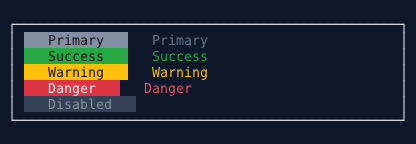
ButtonControl is a clickable button that responds to keyboard (Space/Enter) and mouse clicks. It supports custom text, width, colors, and click event handlers.
Properties#
Events#
Using Builder (Recommended)#
var button = Controls.Button("Click Me")
    .WithWidth(20)
    .WithAlignment(HorizontalAlignment.Center)
    .OnClick((sender, e, window) =>
    {
        // Handle click - window parameter available
        windowSystem.NotificationStateService.ShowNotification(
            "Button Clicked",
            "You clicked the button!",
            NotificationSeverity.Info
        );
    })
    .Build();

window.AddControl(button);
Using Constructor#
var button = new ButtonControl
{
    Text = "Submit",
    Width = 15,
    IsEnabled = true
};

button.OnClick += (sender, e) =>
{
    // Handle click
};

window.AddControl(button);
Keyboard Support#
Mouse Support#
Visual States#
Buttons have different appearances based on state:
- Normal: Default appearance
- Focused: Highlighted when has keyboard focus
- Disabled: Dimmed appearance when
IsEnabled = false
- Pressed: Visual feedback during click (brief)
Examples#
window.AddControl(
    Controls.Button("OK")
        .OnClick((s, e, w) => w.Close())
        .Build()
);
window.AddControl(
    Controls.Button("Submit")
        .WithWidth(30)
        .WithAlignment(HorizontalAlignment.Center)
        .OnClick((s, e, w) =>
        {
            // Handle submission
        })
        .Build()
);
window.AddControl(
    Controls.Prompt("Enter name:")
        .WithName("nameInput")
        .Build()
);

window.AddControl(
    Controls.Button("Greet")
        .OnClick((sender, e, window) =>
        {
            var input = window.FindControl<PromptControl>("nameInput");
            var name = input?.Text ?? "stranger";

            windowSystem.NotificationStateService.ShowNotification(
                "Greeting",
                $"Hello, {name}!",
                NotificationSeverity.Success
            );
        })
        .Build()
);
var submitButton = Controls.Button("Submit")
    .WithName("submitBtn")
    .OnClick((s, e, w) => { /* ... */ })
    .Build();

submitButton.IsEnabled = false;  // Disable initially
window.AddControl(submitButton);

// Enable when validation passes
window.AddControl(
    Controls.Prompt("Required field:")
        .OnInputChanged((sender, text, window) =>
        {
            var btn = window.FindControl<ButtonControl>("submitBtn");
            if (btn != null)
            {
                btn.IsEnabled = !string.IsNullOrWhiteSpace(text);
            }
        })
        .Build()
);
window.AddControl(
    Controls.HorizontalGrid()
        .Column(col => col.Add(
            Controls.Button("Save")
                .OnClick((s, e, w) => SaveData())
                .Build()
        ))
        .Column(col => col.Add(
            Controls.Button("Cancel")
                .OnClick((s, e, w) => w.Close())
                .Build()
        ))
        .Column(col => col.Add(
            Controls.Button("Reset")
                .OnClick((s, e, w) => ResetForm())
                .Build()
        ))
        .Build()
);
var button = new ButtonControl
{
    Text = "Delete",
    Width = 15,
    BackgroundColor = Color.Red,
    ForegroundColor = Color.White
};

button.OnClick += (sender, e) =>
{
    // Show confirmation dialog
};

window.AddControl(button);
Best Practices#
- Use descriptive text: Button text should clearly indicate the action ("Save", "Delete", not "OK")
- Consistent width: Use fixed width for buttons in the same group
- Center important buttons: Use alignment for visual emphasis
- Disable when invalid: Disable buttons when actions can't be performed
- Provide feedback: Show notifications or update UI after button clicks
- Use window parameter: In OnClick handlers, use the window parameter to access other controls
Common Patterns#
Confirm/Cancel Pair#
window.AddControl(
    Controls.HorizontalGrid()
        .Column(col => col.Add(
            Controls.Button("Confirm")
                .OnClick((s, e, w) =>
                {
                    // Perform action
                    w.Close();
                })
                .Build()
        ))
        .Column(col => col.Add(
            Controls.Button("Cancel")
                .OnClick((s, e, w) => w.Close())
                .Build()
        ))
        .Build()
);
// Add input
window.AddControl(
    Controls.Prompt("Email:")
        .WithName("email")
        .Build()
);

// Add submit button
window.AddControl(
    Controls.Button("Submit")
        .WithName("submitBtn")
        .OnClick((sender, e, window) =>
        {
            var email = window.FindControl<PromptControl>("email")?.Text;

            if (string.IsNullOrWhiteSpace(email) || !email.Contains("@"))
            {
                windowSystem.NotificationStateService.ShowNotification(
                    "Validation Error",
                    "Please enter a valid email address",
                    NotificationSeverity.Warning
                );
                return;
            }

            // Process valid email
            windowSystem.NotificationStateService.ShowNotification(
                "Success",
                "Form submitted successfully!",
                NotificationSeverity.Success
            );
        })
        .Build()
);
window.AddControl(
    Controls.Button("Refresh Data")
        .OnClick(async (sender, e, window) =>
        {
            var button = sender as ButtonControl;
            if (button != null)
            {
                button.IsEnabled = false;
                button.Text = "Loading...";
            }

            try
            {
                await LoadDataAsync();

                windowSystem.NotificationStateService.ShowNotification(
                    "Success",
                    "Data refreshed",
                    NotificationSeverity.Success
                );
            }
            finally
            {
                if (button != null)
                {
                    button.IsEnabled = true;
                    button.Text = "Refresh Data";
                }
            }
        })
        .Build()
);
See Also#
Back to Controls | Back to Main Documentation