HtmlControl
Render real HTML content in the terminal with scrolling, link navigation, and inline images.
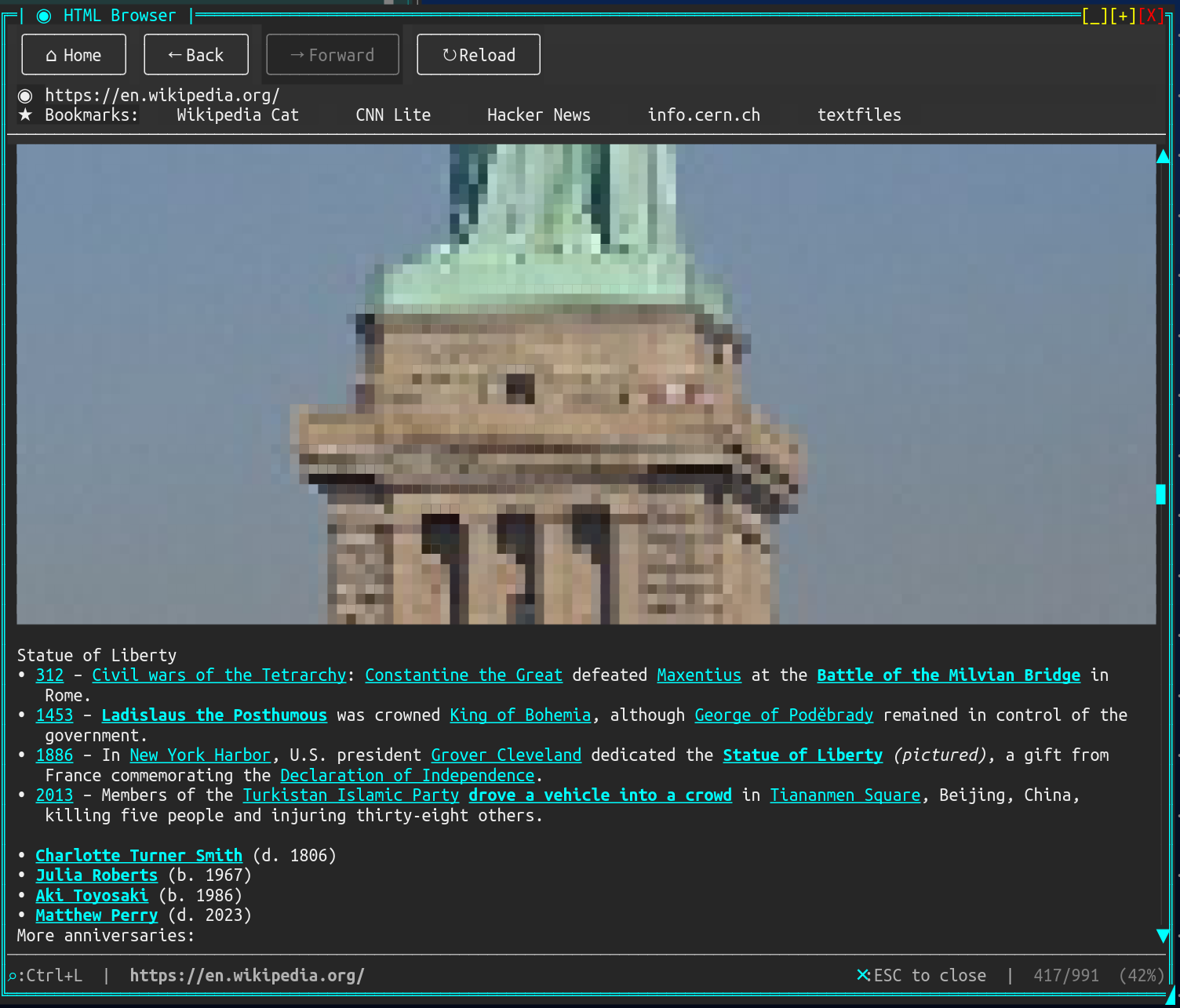
Overview#
HtmlControl parses and renders HTML content using the AngleSharp HTML parser, displaying it with colors, text formatting, block layout, tables, lists, images (via half-block rendering), and interactive link navigation. It supports both inline HTML content and loading from URLs with progressive image loading.
Properties#
| Property | Type | Default | Description |
|---|---|---|---|
ForegroundColor |
Color |
Theme default | Default text color |
BackgroundColor |
Color |
Theme default | Background color |
LinkColor |
Color |
Cyan | Color for unvisited links |
VisitedLinkColor |
Color |
Purple | Color for visited links |
ShowImages |
bool |
false |
Enable half-block image rendering |
ShowBulletPoints |
bool |
true |
Show bullet characters for <ul> lists |
TabSize |
int |
4 |
Tab stop width in characters |
BlockSpacing |
int |
1 |
Blank lines between block elements |
ScrollbarVisibility |
ScrollbarVisibility |
Auto |
When to show the vertical scrollbar |
LoadingText |
string |
"Loading..." |
Text shown during URL loading |
ScrollOffset |
int |
0 |
Current vertical scroll position |
ContentHeight |
int |
(read-only) | Total height of rendered content |
IsLoading |
bool |
(read-only) | Whether a URL is currently loading |
LoadingStatus |
string? |
(read-only) | Current loading phase description |
CurrentUrl |
string? |
(read-only) | URL of the currently loaded page |
RawHtml |
string? |
(read-only) | The raw HTML source |
MouseWheelScrollSpeed |
int |
ControlDefaults.DefaultScrollWheelLines (1) |
Lines scrolled per mouse wheel tick; values below 1 clamp to 1 |
IsEnabled |
bool |
true |
Whether the control accepts input |
Events#
| Event | Arguments | Description |
|---|---|---|
LinkClicked |
LinkClickedEventArgs(Url, Text, Mouse?) |
A link was activated (click or Enter) |
LinkHover |
LinkHoverEventArgs |
Mouse moved over a link |
ContentLoaded |
EventArgs |
HTML content was parsed and laid out |
LoadingCompleted |
EventArgs |
URL loading and image loading finished |
LoadError |
LoadErrorEventArgs |
An error occurred during URL loading |
MouseClick |
MouseEventArgs |
Non-link area was clicked |
MouseRightClick |
MouseEventArgs |
Right-click on the control |
Creating HtmlControl#
Using Builder (Recommended)#
var html = Controls.Html()
    .WithContent("<h1>Hello World</h1><p>This is <b>bold</b> and <em>italic</em>.</p>")
    .WithLinkColor(Color.Cyan1)
    .WithShowImages(true)
    .WithScrollbarVisibility(ScrollbarVisibility.Auto)
    .WithMouseWheelScrollSpeed(3)
    .OnLinkClicked((sender, e) => Console.WriteLine($"Clicked: {e.Url}"))
    .Fill()
    .Build();

window.AddControl(html);
WithMouseWheelScrollSpeed(int speed) sets how many lines scroll per wheel notch (values below 1
clamp to 1). It defaults to ControlDefaults.DefaultScrollWheelLines, so setting that once at
startup changes the wheel step for every control that hasn't overridden it:
// Change the wheel step everywhere, once at startup:
ControlDefaults.DefaultScrollWheelLines = 3;
Using Constructor#
var html = new HtmlControl();
html.SetContent("<h1>Hello</h1><p>World</p>");
html.LinkClicked += (sender, e) => NavigateTo(e.Url);
window.AddControl(html);
Loading from URL#
var html = Controls.Html()
    .WithShowImages(true)
    .Fill()
    .Build();

window.AddControl(html);

// Load asynchronously — shows loading banner while fetching
await html.LoadUrlAsync("https://example.com");
Loading with Base URL#
// Set content with a base URL for resolving relative links and images
html.SetContent(htmlString, "https://example.com/page/");
Keyboard Support#
| Key | Action |
|---|---|
Up Arrow |
Scroll up one line |
Down Arrow |
Scroll down one line |
Page Up |
Scroll up one viewport |
Page Down |
Scroll down one viewport |
Home |
Scroll to top |
End |
Scroll to bottom |
Tab |
Focus next link |
Shift+Tab |
Focus previous link |
Enter |
Activate focused link (fires LinkClicked) |
Mouse Support#
| Action | Result |
|---|---|
| Click on link | Fires LinkClicked event |
| Click on scrollbar | Scroll to position |
| Drag scrollbar thumb | Smooth scrolling |
| Mouse wheel | Scroll up/down |
| Hover over link | Fires LinkHover, brightens link text |
| Right-click | Fires MouseRightClick |
Focus Behavior#
HtmlControl implements IFocusableControl and IInteractiveControl:
- Tab focus: Control receives focus via Tab key navigation
- Mouse focus: Clicking anywhere on the control (including scrollbar) sets focus
- Visual indicator: Scrollbar thumb turns cyan when focused
- Link highlight: Focused link is shown with inverted colors (foreground/background swapped)
- Multi-line links: Links spanning multiple lines are treated as a single Tab stop; all segments highlight together
Supported HTML Elements#
Block Elements#
<h1>–<h6>, <p>, <div>, <blockquote>, <pre>, <code>, <hr>, <br>, <table>, <ul>, <ol>, <li>, <dl>, <dt>, <dd>, <details>, <summary>, <figure>, <figcaption>
Inline Elements#
<b>, <strong>, <i>, <em>, <u>, <s>, <strike>, <del>, <code>, <a>, <span>, <sub>, <sup>, <mark>, <small>, <abbr>
Tables#
<table>, <thead>, <tbody>, <tfoot>, <tr>, <th>, <td> — with column width calculation, borders, and header styling.
Images#
<img src="..." alt="..."> — rendered using half-block pixel art when ShowImages is enabled. Supports PNG, JPEG, BMP, GIF and TGA (not TIFF). Images respect the HTML width attribute. Progressive loading fetches and renders images in the background after initial text layout.
Examples#
Simple HTML Content#
var html = Controls.Html()
    .WithContent("""
        <h1>Welcome</h1>
        <p>This is a paragraph with <b>bold</b> and <em>italic</em> text.</p>
        <ul>
            <li>Item one</li>
            <li>Item two</li>
            <li>Item three</li>
        </ul>
    """)
    .Fill()
    .Build();
Web Browser with Navigation#
var html = Controls.Html()
    .WithShowImages(true)
    .OnLinkClicked(async (sender, e) =>
    {
        var control = (HtmlControl)sender!;
        await control.LoadUrlAsync(e.Url);
    })
    .Fill()
    .Build();

await html.LoadUrlAsync("https://en.wikipedia.org/wiki/Main_Page");
Email Viewer#
var html = Controls.Html()
    .WithShowImages(false)  // Don't load remote images in emails
    .WithLinkColor(Color.Blue)
    .WithBackgroundColor(Color.White)
    .WithForegroundColor(Color.Black)
    .Fill()
    .Build();

html.SetContent(emailHtmlBody, emailBaseUrl);
Link Hover Status Bar#
var statusLabel = Controls.Markup().Build();

var html = Controls.Html()
    .OnLinkHover((sender, e) =>
    {
        statusLabel.SetContent(new List<string>
        {
            e.Url != null ? $"[dim]{e.Url}[/]" : ""
        });
    })
    .Fill()
    .Build();
Custom Colors and Styling#
var html = Controls.Html()
    .WithContent("<h1>Dark Theme</h1><p>Content here</p>")
    .WithForegroundColor(new Color(200, 200, 200))
    .WithBackgroundColor(new Color(30, 30, 30))
    .WithLinkColor(Color.Cyan1)
    .WithVisitedLinkColor(new Color(180, 130, 255))
    .WithBlockSpacing(2)
    .Fill()
    .Build();
Performance Notes#
- DOM caching: The HTML parser caches the parsed DOM document. Width-only changes (e.g., window resize) skip re-parsing and only re-flow the layout.
- Resize debouncing: During rapid resize, relayout is debounced (150ms) to keep the UI responsive. Content renders at the previous width until resize settles.
- Progressive image loading: When
ShowImagesis enabled, text content renders immediately. Images load in the background and are progressively committed to the layout. - Large documents: For very large HTML documents, consider setting an explicit
Heightto avoid measuring the full document height.
Best Practices#
- Use
ShowImages = trueonly when image content is expected — it enables background HTTP fetches - Handle
LinkClickedto implement navigation; the control does not navigate automatically - Use
SetContent(html, baseUrl)when HTML contains relative URLs - For email rendering, disable images and set explicit colors for readability
- Use
LoadUrlAsyncwith cancellation support for user-navigatable content - The control consumes Tab key for link navigation — use
Shift+Tabto move focus away
NativeAOT#
HtmlControl works under NativeAOT — a published native binary renders HTML (including CSS calc()) correctly, verified by the library's AOT smoke test.
The one caveat: its dependency AngleSharp.Css evaluates CSS calc() via reflection, so AOT-publishing an app that uses HtmlControl surfaces 4 IL2072 trim warnings (from AngleSharp.Css, not SharpConsoleUI). They're an analysis limitation, not a runtime failure. If your build treats trim warnings as errors, see NativeAOT Compatibility → HtmlControl caveat for the scoped .csproj fix. If you don't use HtmlControl, the rest of the library is AOT-clean with no action needed.
See Also#
- MarkupControl — for simple formatted text without HTML parsing
- Image Rendering — for standalone image display
- Compositor Effects — for post-processing visual effects
- Controls Reference — complete control listing