RadioControl / RadioGroup
Single-select radio button control, coordinated through an explicit group object that enforces the single-selection invariant.
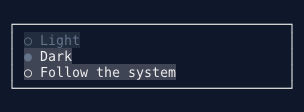
Overview#
RadioControl<T> renders a (●) / (○) indicator next to a text label and selects itself through a shared RadioGroup<T> when activated. The group is the single source of truth: it owns the selected value, enforces the single-selection rule, and fires SelectionChanged exactly once per change. Each radio's Checked property is computed — it reflects EqualityComparer<T>.Default.Equals(Group.SelectedValue, Value) and carries no stored state, making desync impossible by design.
Radios are independent Tab stops that you lay out wherever your window design requires — inside a stack of controls in a ScrollablePanelControl, spread across multiple columns of a GridControl, or mixed with other control types. The group coordinates them all regardless of layout nesting, because membership is explicit (each radio holds a reference to the group) rather than discovered by scanning siblings.
The label wraps to the available width by default (Wrap = true), with continuation lines hanging-indented to align under the label text rather than under the marker. Set Wrap = false for single-line clipped behavior.
See also: CheckboxControl
Quick Start#
// Simple string group — label doubles as value
var group = Controls.RadioGroup<string>()
    .OnSelectionChanged(value => windowSystem.NotificationStateService
        .ShowNotification("Theme", value ?? "none", NotificationSeverity.Info))
    .Build();

panel.AddControl(Controls.Radio(group, "Light").Build());
panel.AddControl(Controls.Radio(group, "Dark").Selected().Build());
panel.AddControl(Controls.Radio(group, "System").Build());
RadioGroup API#
RadioGroup<T> is a non-visual coordination object — it has no layout or paint. Create one via the builder or the constructor:
var group = Controls.RadioGroup<MyEnum>()
    .Required()
    .WithSelectedValue(MyEnum.DefaultOption)
    .OnSelectionChanged(v => Apply(v))
    .Build();
RadioGroupBuilder<T> Methods#
| Method | Description |
|---|---|
.AllowDeselect(bool allow = true) |
Clicking the already-selected radio clears the selection. No-op when Required is also set (Required wins). Default: false. |
.Required(bool required = true) |
Once a selection exists, deselect and Clear() become no-ops. Does not force an initial selection — the group starts empty. Default: false. |
.WithSelectedValue(T value) |
Pre-selects a value when the group is built. |
.OnSelectionChanged(Action<T?> handler) |
Subscribes to SelectionChanged at build time. The argument is the new value, or null/default when the selection is cleared. |
.Build() |
Returns the configured RadioGroup<T>. |
RadioGroup<T> Properties#
| Property | Type | Description |
|---|---|---|
SelectedValue |
T? |
The currently selected value. Setting it updates the selection (honoring Required), repaints the affected members, and fires SelectionChanged once. Default: default(T) (no selection). |
HasSelection |
bool |
true when a value is selected. |
AllowDeselect |
bool |
See builder method above. |
Required |
bool |
See builder method above. |
SelectedRadio |
RadioControl<T>? |
The member whose Value equals the current selection, or null. |
Members |
IReadOnlyList<RadioControl<T>> |
Radios registered to this group, in registration order. |
RadioGroup<T> Methods#
| Method | Description |
|---|---|
Clear() |
Clears the selection to none. No-op when Required is true and a selection exists. Fires SelectionChanged once if the state changed. |
RadioGroup<T> Events#
| Event | Arguments | Description |
|---|---|---|
SelectionChanged |
EventHandler<T?> |
Fires once per selection change; argument is the new value or default when cleared. |
SelectionChangedAsync |
AsyncEventHandler<T?> |
Async counterpart of SelectionChanged. |
Selection State Rules#
| Situation | Result |
|---|---|
| Click/activate an unselected radio | Selects it; fires SelectionChanged once. |
Click/activate the already-selected radio, Required = false, AllowDeselect = false (default) |
No-op (classic radio behavior). |
Click/activate the already-selected radio, Required = false, AllowDeselect = true |
Clears to none; fires SelectionChanged once. |
Click/activate the already-selected radio, Required = true |
No-op; Required wins over AllowDeselect. |
Clear(), Required = false |
Clears to none; fires SelectionChanged if changed. |
Clear(), Required = true, HasSelection = true |
No-op. |
New group (any Required setting) |
Starts with no selection. Required does not force an initial selection. |
⚠️ Choosing the type parameter T — equality matters#
Selection is matched with EqualityComparer<T>.Default (an AOT-safe choice — no reflection). Every
"is this radio selected?" check compares Group.SelectedValue to a radio's Value this way. That means
how T implements equality directly determines whether selection works:
enum, primitive,string,record, or astruct→ structural (value) equality by default. Everything "just works":group.SelectedValue = MyEnum.Largematches the radio whoseValueisMyEnum.Large, even a freshly-read one.A plain
classthat does not overrideEquals/GetHashCode→ reference equality. Two different instances that represent the same option are considered not equal. So this fails silently:// BAD: Option is a plain class with no Equals override var g = new RadioGroup<Option>(); var r = new RadioControl<Option>(g, new Option("A"), "A"); g.SelectedValue = new Option("A"); // a DIFFERENT instance // r.Checked == false — no radio lights up, no exception, just "nothing selected"This is a common source of "my radio won't select" head-scratching, especially when the value comes from deserialization, a database row, or a
.Select(...)projection that builds fresh instances.
Recommendation: prefer an enum, a record, or a value type for T. If you must use a reference
type, either reuse the same instances you gave the radios (e.g. select via radio.Select() or
group.SelectedValue = existingRadio.Value) or give the type real structural equality
(a record, or override Equals/GetHashCode).
RadioControl API#
Builder#
// Typed value
var radio = Controls.Radio(group, MyEnum.Option, "Label text").Build();

// String group — label is the value
var radio = Controls.Radio(stringGroup, "Option label").Build();
Controls Factory Methods#
| Method | Description |
|---|---|
Controls.RadioGroup<T>() |
Returns a RadioGroupBuilder<T>. |
Controls.Radio<T>(RadioGroup<T> group, T value, string label = "") |
Returns a RadioBuilder<T> for the given group, value, and optional label. |
Controls.Radio(RadioGroup<string> group, string label) |
Shorthand for string groups where the label is also the value. Equivalent to Radio<string>(group, label, label). |
RadioBuilder<T> Methods#
Content
| Method | Description |
|---|---|
.WithLabel(string label) |
Sets the label text. |
.Selected() |
Sets this radio as the initially selected option (sets group.SelectedValue at build time). If two radios in the same group call .Selected(), the last built wins and a debug log entry is emitted. |
.WithSelectedCharacter(string character) |
Overrides the selected indicator (default "●"). |
.WithUnselectedCharacter(string character) |
Overrides the unselected indicator (default "○"). |
Appearance
| Method | Description |
|---|---|
.WithColorRole(ColorRole role, ThemeMode? mode = null) |
Sets the semantic color role. |
.Outline(bool outline = true) |
Renders in outline style (role color on text, surface fill). |
Layout
| Method | Description |
|---|---|
.Wrap(bool wrap = true) |
Enables or disables label wrapping (default true). |
.WithAlignment(HorizontalAlignment alignment) |
Horizontal alignment within the allocated space. |
.WithVerticalAlignment(VerticalAlignment alignment) |
Vertical alignment within the allocated space. |
.WithMargin(int left, int top, int right, int bottom) |
Per-side margin. |
.WithMargin(int margin) |
Uniform margin. |
Identity
| Method | Description |
|---|---|
.WithName(string name) |
Name for FindControl<RadioControl<T>>(name) lookups. |
Building
RadioControl<T> radio = builder.Build();
RadioControl<T> Properties#
| Property | Type | Default | Description |
|---|---|---|---|
Group |
RadioGroup<T> |
(constructor) | The coordinating group. |
Value |
T |
(constructor) | The value this radio represents. |
Checked |
bool |
computed | Whether this radio is the group's selected option. Computed from the group; never stored independently. |
Label |
string |
"" |
Text displayed next to the radio indicator. |
SelectedCharacter |
string |
"●" |
Indicator shown when selected. Empty or null falls back to "●". |
UnselectedCharacter |
string |
"○" |
Indicator shown when unselected. Empty or null falls back to "○". |
Wrap |
bool |
true |
Whether the label wraps to the available width with a hanging indent on continuation lines. |
IsEnabled |
bool |
true |
Whether the control accepts input. A disabled radio that is currently selected still renders as selected (greyed, not cleared). |
CheckmarkColor |
Color |
theme CheckboxCheckmarkColor / Color.Cyan1 |
Color of the selected indicator glyph. |
BackgroundColor |
Color? |
null |
Background color in the normal state. Inherits from container/theme when null. |
ForegroundColor |
Color |
theme / Color.White |
Label color in the normal state. |
FocusedBackgroundColor |
Color? |
null |
Background color when focused. |
FocusedForegroundColor |
Color |
theme / Color.White |
Label color when focused. |
DisabledBackgroundColor |
Color? |
null |
Background color when disabled. |
DisabledForegroundColor |
Color |
theme / Color.DarkSlateGray1 |
Label color when disabled. |
HasFocus |
bool |
— | Read-only. Whether the control currently has keyboard focus. |
CanReceiveFocus |
bool |
— | Read-only. true when IsEnabled. |
WantsMouseEvents |
bool |
— | Read-only. true when IsEnabled. |
CanFocusWithMouse |
bool |
— | Read-only. true when IsEnabled. |
RadioControl<T> Methods#
| Method | Description |
|---|---|
Select() |
Activates this radio through the group, honoring the group's AllowDeselect/Required policy. Equivalent to a Space/Enter key press. |
RadioControl<T> Events#
| Event | Arguments | Description |
|---|---|---|
MouseClick |
EventHandler<MouseEventArgs> |
Fires when the radio is left-clicked. |
MouseDoubleClick |
EventHandler<MouseEventArgs> |
Fires when the radio is double-clicked (does not select again). |
MouseRightClick |
EventHandler<MouseEventArgs> |
Fires when the radio is right-clicked. |
MouseEnter |
EventHandler<MouseEventArgs> |
Fires when the mouse enters the radio area. |
MouseLeave |
EventHandler<MouseEventArgs> |
Fires when the mouse leaves the radio area. |
MouseMove |
EventHandler<MouseEventArgs> |
Fires when the mouse moves over the radio. |
Selection events are on RadioGroup<T>, not on individual radios.
Keyboard Support#
| Key | Action |
|---|---|
| Space | Select this radio through the group. |
| Enter | Select this radio through the group. |
| Tab | Move focus to the next control. |
| Shift+Tab | Move focus to the previous control. |
Keys are only processed when the radio is enabled and focused.
Mouse Support#
| Action | Result |
|---|---|
| Left click | Focuses and selects the radio through the group. |
| Double click | Fires MouseDoubleClick; does not repeat selection. |
| Right click | Fires MouseRightClick. |
| Enter / Leave | Fires MouseEnter / MouseLeave. |
Clicks in the control's margin area are ignored.
Label Wrapping and Alignment#
Wrap (default true)#
When Wrap is true, the label wraps into the columns remaining after the indicator prefix ((●) ). Continuation lines are hanging-indented to align under the label text (not under the indicator), so long option descriptions read naturally:
(●) Enable the experimental low-latency
    renderer — this long label wraps
    across lines.
When Wrap is false, the label is clipped to a single line, matching CheckboxControl's behavior.
HorizontalAlignment#
RadioControl<T> inherits HorizontalAlignment from BaseControl:
- Left (default) — the indicator+label block is flush left.
- Center — the block is centered within the allocated width (integer division, floored).
- Right — the block is flush right.
- Stretch — the block fills the full allocated width; the label wraps to the remaining width after the indicator prefix.
VerticalAlignment#
VerticalAlignment positions the content block (all wrapped lines together) within a taller allocated row:
- Top (default) — block starts at the top.
- Center — block is vertically centered.
- Bottom — block is flush with the bottom.
- Fill — uses the natural line count from the top.
Examples#
Simple String Group#
var group = Controls.RadioGroup<string>()
    .OnSelectionChanged(value =>
        label.SetContent(new List<string> { $"Theme: {value ?? "none"}" }))
    .Build();

panel.AddControl(Controls.Radio(group, "Light").Build());
panel.AddControl(Controls.Radio(group, "Dark").Selected().Build());
panel.AddControl(Controls.Radio(group, "System").Build());
Typed Enum Group with Required#
Once the user makes a selection, the group cannot return to "none":
private enum Size { Small, Medium, Large }

var group = Controls.RadioGroup<Size>()
    .Required()
    .OnSelectionChanged(v =>
        readout.SetContent(new List<string> { $"Size: {v}" }))
    .Build();

panel.AddControl(Controls.Radio(group, Size.Small, "Small").Build());
panel.AddControl(Controls.Radio(group, Size.Medium, "Medium").Selected().Build());
panel.AddControl(Controls.Radio(group, Size.Large, "Large").Build());
AllowDeselect Group#
Clicking the selected radio clears the group back to "none":
var group = Controls.RadioGroup<string>()
    .AllowDeselect()
    .Build();

panel.AddControl(Controls.Radio(group, "Card").Build());
panel.AddControl(Controls.Radio(group, "Cash").Build());
Long Labels with Wrapping#
Wrapping is on by default; set a narrow margin so the label has room to wrap:
var group = Controls.RadioGroup<string>().Build();
panel.AddControl(
    Controls.Radio(group, "experimental",
        "Enable the experimental low-latency renderer — this long label wraps across lines with a hanging indent under the marker.")
        .Selected()
        .WithMargin(2, 0, 2, 0)
        .Build()
);
Disabled Radio (Disabled-but-Selected)#
A disabled radio does not accept input but still renders its current selection state — it shows greyed-but-filled when it is the group's selected member:
var group = Controls.RadioGroup<string>().Build();
var selected = Controls.Radio(group, "Locked (selected)").Selected().Build();
selected.IsEnabled = false;   // greyed, still shows ●

var other = Controls.Radio(group, "Locked (unselected)").Build();
other.IsEnabled = false;

panel.AddControl(selected);
panel.AddControl(other);
Cross-Column Group (Grid Layout)#
Because coordination goes through the group object (not through sibling scanning), radios from the same group can be placed in different grid columns or even different panels:
var groupA = Controls.RadioGroup<string>().Build();

// Group A spans two ScrollablePanel cells in different columns
var col0 = Controls.ScrollablePanel()
    .AddControl(Controls.Radio(groupA, "Alpha").Build())
    .AddControl(Controls.Radio(groupA, "Bravo").Build())
    .Build();

var col1 = Controls.ScrollablePanel()
    .AddControl(Controls.Radio(groupA, "Charlie").Build())
    .AddControl(Controls.Radio(groupA, "Delta").Build())
    .Build();

var grid = Controls.Grid()
    .Columns(GridLength.Star(1), GridLength.Star(1))
    .Rows(GridLength.Auto())
    .Place(col0, 0, 0)
    .Place(col1, 0, 1)
    .Build();

// Selecting "Delta" (col 1) automatically deselects "Alpha"/"Bravo" (col 0).
Best Practices#
- One group object per mutually-exclusive set. Groups are explicit — if you want two independent sets of options, create two
RadioGroup<T>instances. - Use
.Required()for mandatory choices. Once the user picks an option,Requiredprevents accidental deselection. It does not force a default — use.Selected()on a radio or.WithSelectedValue(...)on the group builder for that. - React at the group level. Subscribe to
RadioGroup<T>.SelectionChanged(or.OnSelectionChanged(...)on the builder) rather than attaching click handlers to individual radios. The group fires exactly once per change. - Typed values over strings where possible. Using an enum or record
Tlets the compiler catch value typos and makesEqualityComparer<T>.Defaultmeaningful without any extra work. - Wrap long labels.
Wrapdefaults totrue; keep it on for descriptive option text so it flows naturally. Use a right/left margin to control the available wrapping width. - Mutate group and radio state on the UI thread. Wrap background-thread changes in
windowSystem.EnqueueOnUIThread(...).Container?.Invalidate(Invalidation.Repaint)is the only thread-safe call from background threads. - Don't store
Checkedyourself.Checkedis computed from the group; readinggroup.SelectedValueorgroup.HasSelectionis the canonical way to check the current selection, not polling individual radios.
See Also#
- CheckboxControl - Independent toggle (no group coordination)
- DropdownControl - Single-select from a compact list
- ListControl - Always-visible scrollable selection list